Rekort vs Loom: Local Auto-Zoom or Cloud Video Messaging? (2026)
Rekort records locally with auto-zoom on click. Loom uploads to the cloud with share links. Here's how they compare and when each is the better choice.
Rekort and Loom are both screen recorders, but they solve fundamentally different problems. Loom is built for async team communication — record your screen, get a share link, let colleagues watch and comment on their own time. Rekort is built for polished local recordings — record your screen, and every click automatically zooms in so viewers see exactly what you're interacting with. The overlap is "screen recording." The workflows diverge from there.
Disclosure: We built Rekort. We've tried to write this comparison honestly, including cases where Loom is the better choice.
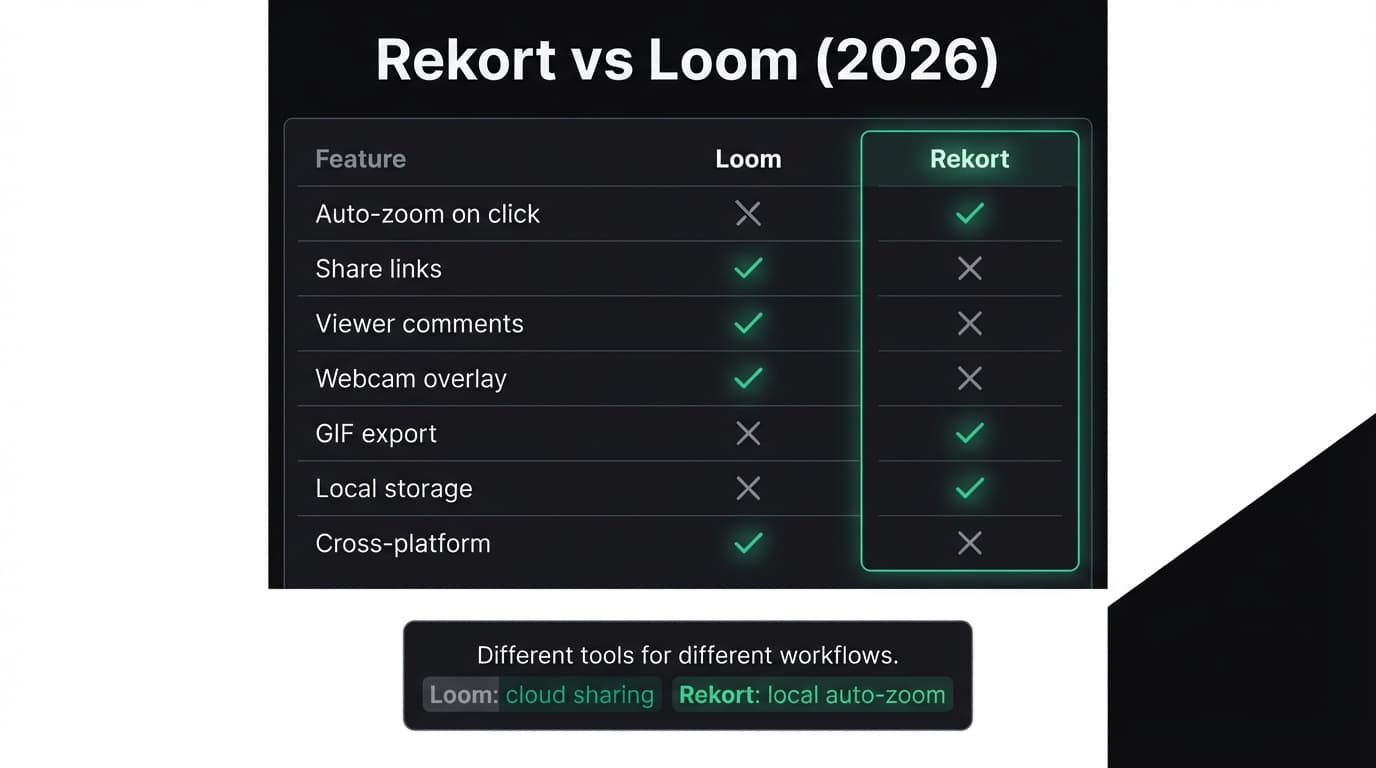
Quick comparison: For a side-by-side feature table, pricing breakdown, and FAQ, see our Loom vs Rekort comparison page.
What Loom is#
Loom is a cloud-based screen recorder designed for async video messaging. Record your screen — optionally with a webcam overlay — and Loom uploads the recording to its servers and generates a share link. Recipients can watch in their browser, leave timestamped comments, and react with emoji. No file downloads, no video attachments.
Loom was acquired by Atlassian in 2023 and integrates with Jira, Confluence, and the broader Atlassian ecosystem. It runs on Mac, Windows, and as a Chrome extension, making it accessible across platforms and devices. For distributed teams that rely on async communication, Loom replaces the "let me just hop on a quick call" pattern with recordings that viewers watch at their own pace.
Loom's free tier allows 25 recordings with a 5-minute cap per video. Paid plans start at $12.50/user/month (Starter) and $20/user/month (Business), as of March 2026 via Loom pricing.
What Rekort is#
Rekort is a native Mac screen recorder focused on auto-zoom on click. Select a recording area, record normally, and every click automatically zooms in so viewers see exactly what you're interacting with. Preview the recording with zoom applied, adjust the zoom level and transition timing, then export as MP4 or GIF.
Rekort stores all recordings locally. There is no cloud upload, no share links, no viewer analytics, no team management. The scope is deliberately narrow — the goal is a fast path from recording to polished output that you control and distribute yourself.
Rekort is built with Swift and SwiftUI using native macOS frameworks. Pricing is $9/month or $79 lifetime with one tier — no feature gating, no per-seat fees (as of March 2026).
Continue reading
A Simpler Alternative
Auto-zoom on click, timeline editor, MP4 & GIF export. Starting at $9/month or $79 lifetime.
Local vs cloud#
This is the most fundamental difference between the two tools. It shapes everything else — privacy, workflow, pricing, and who each app is for.
Loom uploads every recording to its servers immediately after you finish recording. This is the product's core value proposition: the recording lives at a URL that anyone with the link can watch. No file to attach, no upload step, no "can you download this and open it." For async communication in distributed teams, the cloud-first model removes friction from sharing.
The tradeoff is that your recordings live on Loom's infrastructure. If you're recording product walkthroughs that contain unreleased features, customer data visible on screen, or internal tooling, every recording is stored on a third-party server. Loom offers workspace-level access controls and SSO on higher tiers, but the data leaves your machine by design.
Rekort stores everything locally. Recordings never leave your computer unless you manually share the exported MP4 or GIF file. There is no account, no cloud storage, no server-side processing. You own the files and decide where they go.
The tradeoff is that sharing requires more steps. You export a file, then upload it to Slack, email, Google Drive, or wherever your team communicates. There is no "copy link" button, no viewer comments, no analytics on who watched.
Auto-zoom vs async sharing#
Loom and Rekort optimize for different outcomes from the same raw screen recording.
Loom optimizes for distribution. Record once, share a link, and the recording reaches your audience with minimal friction. The recording itself is captured as-is — what you see on your screen is what viewers see. On high-resolution displays, small UI elements, buttons, and text stay small. Loom does not automatically zoom into clicks or enhance the visual clarity of what you're demonstrating.
Rekort optimizes for visual clarity. Every click during recording triggers an automatic zoom during playback, so viewers see exactly what you interacted with at a readable size. This matters most for product demos, tutorials, and bug reproductions where the specific button, menu item, or text field you clicked is the point of the recording. The output is a polished MP4 or GIF with zoom transitions already baked in.
These are not competing features — they solve different problems. If your goal is "my team needs to see what I just did, quickly," Loom's instant share link is faster. If your goal is "this recording needs to clearly show every interaction at a readable size," Rekort's auto-zoom produces a more legible result.
Pricing#
Loom and Rekort have fundamentally different pricing structures that reflect their different audiences.
Loom uses per-seat pricing (as of March 2026, via Loom pricing):
- Free: 25 recordings, 5-minute cap per video
- Starter: $12.50/user/month
- Business: $20/user/month
For teams, the per-seat model compounds. A 5-person team on Starter costs $62.50/month ($750/year). A 10-person team on Business costs $200/month ($2,400/year). Enterprise pricing is custom.
Rekort has flat pricing with no per-seat fees:
- $9/month, or
- $79 lifetime (one-time, all features)
The comparison is most relevant for individuals. A solo user on Loom Starter pays $150/year. Rekort's lifetime option costs $79 once. For teams, the comparison is less direct — Loom's per-seat pricing includes cloud hosting, viewer analytics, workspace management, and Atlassian integrations that Rekort does not offer.
What Loom does better#
Instant share links. Record, and the link is ready. No file export, no upload step, no attachment size limits. For async communication where speed of sharing matters, this is Loom's core advantage and the reason teams adopt it.
Viewer comments and reactions. Colleagues can leave timestamped comments directly on the recording. This creates a conversation thread around the video without switching to Slack or email. For feedback workflows — design reviews, code walkthroughs, status updates — inline comments keep context attached to the moment in the recording.
Viewer analytics. Loom shows who watched your recording, how much they watched, and when. For managers sending updates or salespeople sending prospecting videos, knowing whether the recipient actually watched is valuable signal.
Webcam overlay. Loom records your webcam alongside your screen. The face-in-corner format is effective for async standups, product walkthroughs with narration, and any context where seeing the speaker adds clarity. Rekort does not have webcam overlay.
Cross-platform. Loom works on Mac, Windows, and as a Chrome extension. Teams with mixed operating systems can standardize on one tool. Rekort is macOS only.
Team and workspace management. Loom offers shared workspaces, folder organization, access controls, and SSO on higher tiers. For organizations with dozens or hundreds of people recording, the administrative layer matters. Rekort has no team features.
What Rekort does better#
Auto-zoom on click. This is the feature that Loom does not have. Every click during your recording triggers a smooth zoom during playback, making small UI elements readable without manual editing. For product demos, tutorials, and bug reproductions, the difference in visual clarity is significant.
Local-first privacy. Recordings never leave your machine. No cloud upload, no third-party storage, no account creation. If you record screens that contain sensitive product details, customer data, or internal tooling, local storage eliminates the question of who else has access.
GIF export with zoom. Rekort exports to GIF with auto-zoom already applied. For GitHub READMEs, PR comments, documentation, and Slack messages, a zoomed GIF communicates more than a raw screen capture or a video link that requires clicking through.
Pricing for individuals. $79 once versus $150+/year on Loom's paid plans. For a solo developer, designer, or content creator who records regularly, the lifetime option is substantially cheaper over time.
Native performance. Rekort is built with Swift and SwiftUI using native macOS frameworks, with tight integration on Apple Silicon.
The overlap#
Both tools record your screen. Beyond that, they diverge. Loom is a communication platform — the recording is a vehicle for a share link and a conversation thread. Rekort is a production tool — the recording is a polished asset with auto-zoom that you distribute yourself. If you need both instant sharing and auto-zoom, you might use both: Rekort for polished demos and documentation, Loom for quick async messages to your team.
For a full side-by-side feature table, choose-if lists, and FAQ, see our Loom vs Rekort comparison page. For a comparison with Screen Studio, which also offers auto-zoom on click, see Rekort vs Screen Studio. For alternatives to Loom that focus on local recording, see Loom alternative. For a broader overview of screen recording options on Mac, see best screen recorder for Mac.
Ready to record?
Rekort auto-zooms every click so your screen recordings look professional. No video editing required.
Download for MacmacOS 14+ · From $9/month or $79 lifetime
Related Articles
Screen Studio Alternative: 5 Options Worth Trying (2026)
14 min read
Cap Alternative for Mac: Auto-Zoom Without the Cloud
8 min read
Cursorful Alternative: Native Mac Auto-Zoom Screen Recording
7 min read
Descript Alternative for Mac: Screen Recording Without the Learning Curve
8 min read
FocuSee Alternative for Mac: Lighter Auto-Zoom Screen Recording
8 min read