FocuSee Alternative for Mac: Lighter Auto-Zoom Screen Recording
Looking for a FocuSee alternative? Compare 5 Mac screen recorders on pricing, auto-zoom, local files, and simplicity. Honest breakdown of what each tool does.
FocuSee is an AI screen recorder by iMobie that auto-zooms on clicks, trims silences, removes filler words, and generates subtitles. At $49.99/year (Standard) or $199.99 for lifetime Advanced access (as of April 2026, via focusee.imobie.com/pricing.htm), it bundles a lot into one tool.
That scope is also why some people look elsewhere. If you need auto-zoom and local files without the AI suite on top, there are lighter options that cost less and stay simpler.
This guide covers five alternatives — what each does well, where it falls short, and who it's for.
Full disclosure: we built Rekort, one of the five tools below.
Why people look for FocuSee alternatives#
Pricing and the AI credits model. FocuSee's AI features — silence removal, filler word trimming, subtitle generation — require AI credits, which are only included in the Advanced plan ($79.99/year or $199.99 lifetime). The Standard plan at $49.99/year doesn't include them. If the AI editing is what drew you in, you're paying for the top tier.
Complexity for occasional use. FocuSee is designed to do a lot: virtual avatars, backgrounds, multi-track editing, captions. If you record a demo once a week and want it zoomed in on the right spots, most of that goes unused. A simpler tool is faster to open and faster to export.
Stability concerns. User reviews mention export crashes and incomplete recordings — problems that are particularly painful after editing a long session. For reliable, quick exports, that's a meaningful trade-off to know about before committing.
Mac-native preference. FocuSee is cross-platform (Windows and Mac). Some Mac users prefer a native app that doesn't rely on Electron or browser runtimes for smooth, consistent performance.
Local-first recording. FocuSee's Standard plan includes 5GB of cloud storage, which means your recordings can end up on iMobie's servers. If you're recording internal workflows or confidential content, local-only export is a meaningful distinction.
Continue reading
A Simpler Alternative
Auto-zoom on click, focused timeline editing, MP4 & GIF export. $9/month, $49/year, or $79 lifetime.
All five tools at a glance#
| Tool | Price | Auto-zoom | Local files | GIF export | Best for |
|---|---|---|---|---|---|
| Rekort | $79 lifetime | Yes | Yes | Yes | Auto-zoom, local-first, Mac |
| Screen Studio | $29/mo or $108/yr | Yes | Yes | Yes | Full production suite |
| Kap | Free | No | Yes | Yes | Free GIF capture |
| Loom | From $12.50/user/mo | No | No | No | Async team video |
| QuickTime | Free (built-in) | No | Yes | No | Quick, no-frills capture |
Rekort#
Price: $9/month, $49/year, or $79 lifetime
Full disclosure: this is our app.
Rekort is a native Mac screen recorder with auto-zoom on click. Select an area, record, and every click during the recording triggers a zoom in the output — no editing required. Preview, adjust zoom timing and level, then export as MP4 or GIF.
Where it differs from FocuSee: Rekort does one thing well and stays out of the way. There's no AI editing suite, no virtual avatar, no subtitle generation. What there is: automatic zoom on every click, local files, and a one-time purchase that doesn't require a credits system to unlock the main feature.
Recordings save to your Mac. Nothing uploads to a server. You export a file and share it however you normally share files.
What it does well:
- Auto-zoom on click — the click target zooms in automatically during recording, no post-recording editing
- Recordings stay local; no cloud upload
- System audio and microphone capture without extra setup
- MP4 and GIF export
- One-time purchase option, no subscription required
Where it falls short:
- No AI editing tools (silence removal, filler word trimming, subtitles)
- No camera overlay or custom backgrounds
- No virtual avatar or AI-generated presenter
- Mac only — no Windows support
- No video hosting or share links
If auto-zoom and local files are the main things you want from FocuSee, Rekort gets there more directly. If you rely on FocuSee's AI editing to clean up your recordings, you'll need something else.
Screen Studio#
Price: $29/month or $108/year
Screen Studio is the most complete Mac screen recorder for polished video output. It has auto-zoom on click, camera overlay, custom backgrounds, smooth zoom animations, and export options that cover most demo and tutorial needs.
Compared to FocuSee, Screen Studio doesn't have AI silence removal or virtual avatars, but its auto-zoom is widely regarded as the best available — smooth, configurable, and reliable. It's a Mac-native app, recordings stay local, and there are no cloud credits or subscriptions required for core features (though the pricing is higher upfront).
What it does well:
- Auto-zoom on click (best-in-class smoothness)
- Camera bubble overlay and background customization
- Native Mac app, recordings stay local
- High-quality MP4 and GIF export
- No ongoing subscription required for standard use
Where it falls short:
- $108/year is expensive for occasional use
- No AI silence removal, filler word trimming, or captions
- No video hosting or share links
- Mac only
Screen Studio is worth considering if you make polished product videos often and want the best auto-zoom without a subscription. For lighter use, the price is harder to justify when Rekort covers the same core feature for less.
Kap#
Price: Free (open-source)
Kap is a free, open-source Mac screen recorder built primarily for GIF export. Record your screen, trim, export as GIF or MP4. No camera overlay, no zoom, no AI features — just a clean recorder that saves locally.
If you're replacing FocuSee primarily to cut costs and don't need auto-zoom or AI editing, Kap works well for GIF-heavy workflows: GitHub READMEs, PR comments, quick UI captures. It's particularly reliable for that specific use case.
What it does well:
- Free and open-source
- Clean GIF and MP4 export
- Recordings stay local
- Lightweight and fast to launch
Where it falls short:
- No auto-zoom or zoom effects of any kind
- No camera overlay, backgrounds, or editing
- No AI tools
- No video hosting or sharing workflow
Kap doesn't replace FocuSee's production features. It's for people who need a free, local recorder with solid GIF output and nothing else.
Loom#
Price: Free (limited) / from $12.50/user/month
Loom is a cloud-based screen recorder built for async team communication. Record your screen and camera, get a share link, let viewers leave comments. The free plan caps recordings at 5 minutes and 25 total videos. Paid plans start at $12.50/user/month (as of April 2026, via Atlassian's pricing page).
Loom doesn't have auto-zoom — not manual, not automatic. It's less focused on polished demo production and more on quick async communication. If FocuSee's share-link workflow appeals more than its auto-zoom, Loom is closer to that use case.
What it does well:
- Easy async sharing with viewer comments
- Free tier covers basic use cases
- Works on Mac, Windows, and Chrome extension
- Familiar to most teams already
Where it falls short:
- No auto-zoom or zoom effects
- Cloud-only recording storage
- Free plan is tightly capped
- No GIF export
If your main reason for using FocuSee is the polished auto-zoom output, Loom isn't a substitute. If it's the async sharing workflow, Loom is worth considering — just know the editing tools are less polished than FocuSee's.
QuickTime Player#
Price: Free (built into macOS)
QuickTime is the zero-friction option. Cmd+Shift+5 opens the Screenshot toolbar, select an area, record. Files save locally. No subscription, no account, no credits.
The trade-offs are significant: no zoom of any kind, no system audio without a third-party routing tool like BlackHole, no GIF export, no editing. It's a raw screen capture, not a production tool.
If FocuSee's complexity is driving you away but you still need polished output, QuickTime is a step backwards. If you just need a quick, no-frills capture and the limitations are acceptable, it's already on your Mac.
What it does well:
- Zero setup, already installed
- Records full screen or selected area
- Microphone audio capture works reliably
- Files stay local
Where it falls short:
- No auto-zoom or zoom effects
- No system audio without BlackHole workaround
- No GIF export
- No editing
Which tool is right for you#
You want auto-zoom on click, local files, and a one-time price: Rekort or Screen Studio. Rekort is lighter and costs less; Screen Studio has better zoom smoothness and more production features.
You want FocuSee's AI editing features (silence removal, captions) without the cloud or credits system: There's no direct equivalent in this list. Descript has AI editing but is more expensive and cloud-based. If AI cleanup is the core requirement, FocuSee's Advanced plan may still be the best fit.
You want free GIF export with local files: Kap.
You want async share links and viewer comments: Loom has a free tier and broader team integrations.
You want the simplest possible recorder already on your Mac: QuickTime Player.
The main trade-off with FocuSee is scope versus simplicity. It handles a wide range of production tasks — zoom, captions, silence removal, virtual avatar — but that breadth comes with a pricing model that requires the top tier for full access, and stability issues that affect longer sessions. If your workflow only needs auto-zoom and local export, a lighter tool gets there faster.
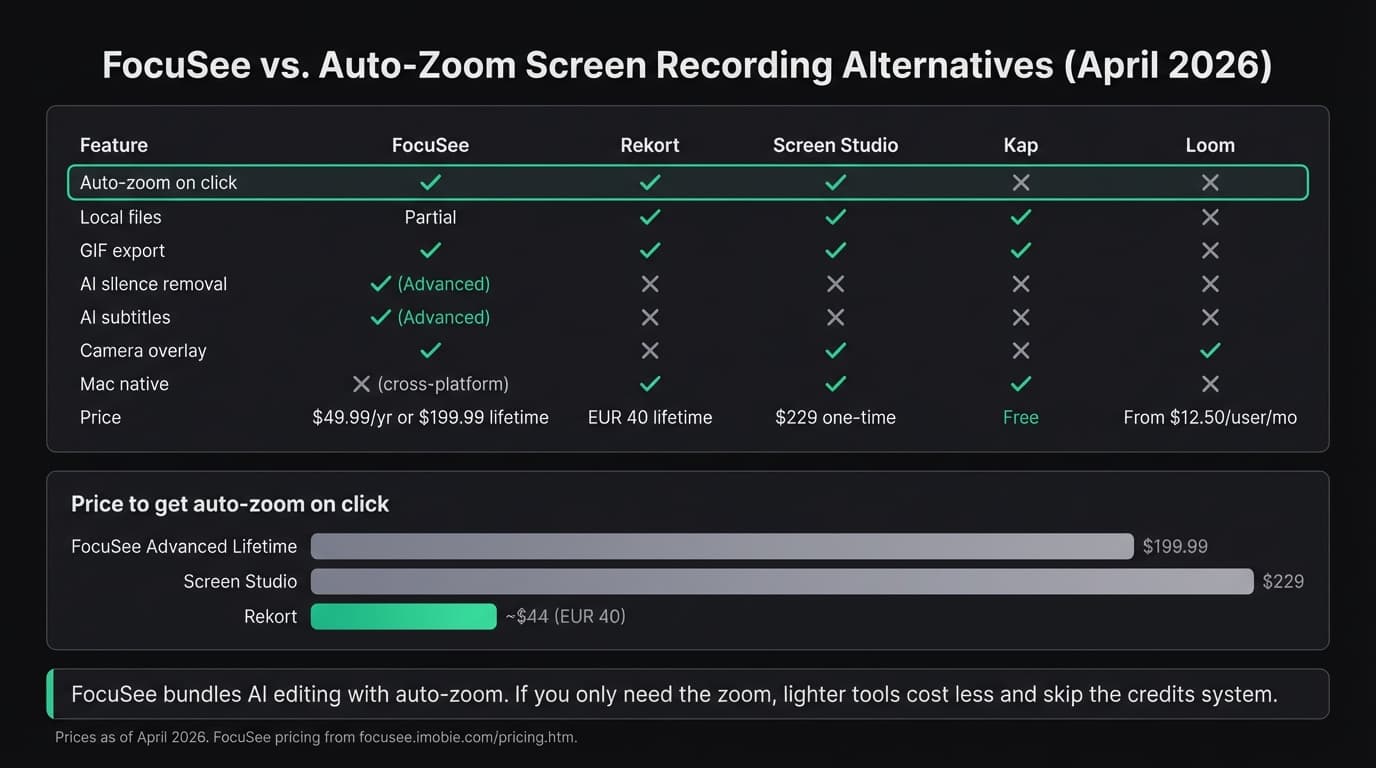
For a broader look at Mac screen recorders, see our best screen recorder for Mac comparison and Screen Studio alternatives.
Ready to record?
Rekort auto-zooms every click so your screen recordings look professional. No video editing required.
Download for MacmacOS 14+ · $9/month, $49/year, or $79 lifetime
Related Articles
Best Screen Studio Alternatives for Mac: Pick by Workflow (2026)
15 min read
OBS Alternative for Mac: Screen Recording Without the Complexity
10 min read
Cap Alternative for Mac: Auto-Zoom Without the Cloud
8 min read
Cursorful Alternative: Native Mac Auto-Zoom Screen Recording
7 min read
Descript Alternative for Mac: Screen Recording Without the Learning Curve
8 min read