Tella Alternative for Mac: Local-First Auto-Zoom Recording
Looking for a Tella alternative? Compare 5 Mac screen recorders on local storage, auto-zoom, pricing, and privacy. Honest breakdown of what each tool does.
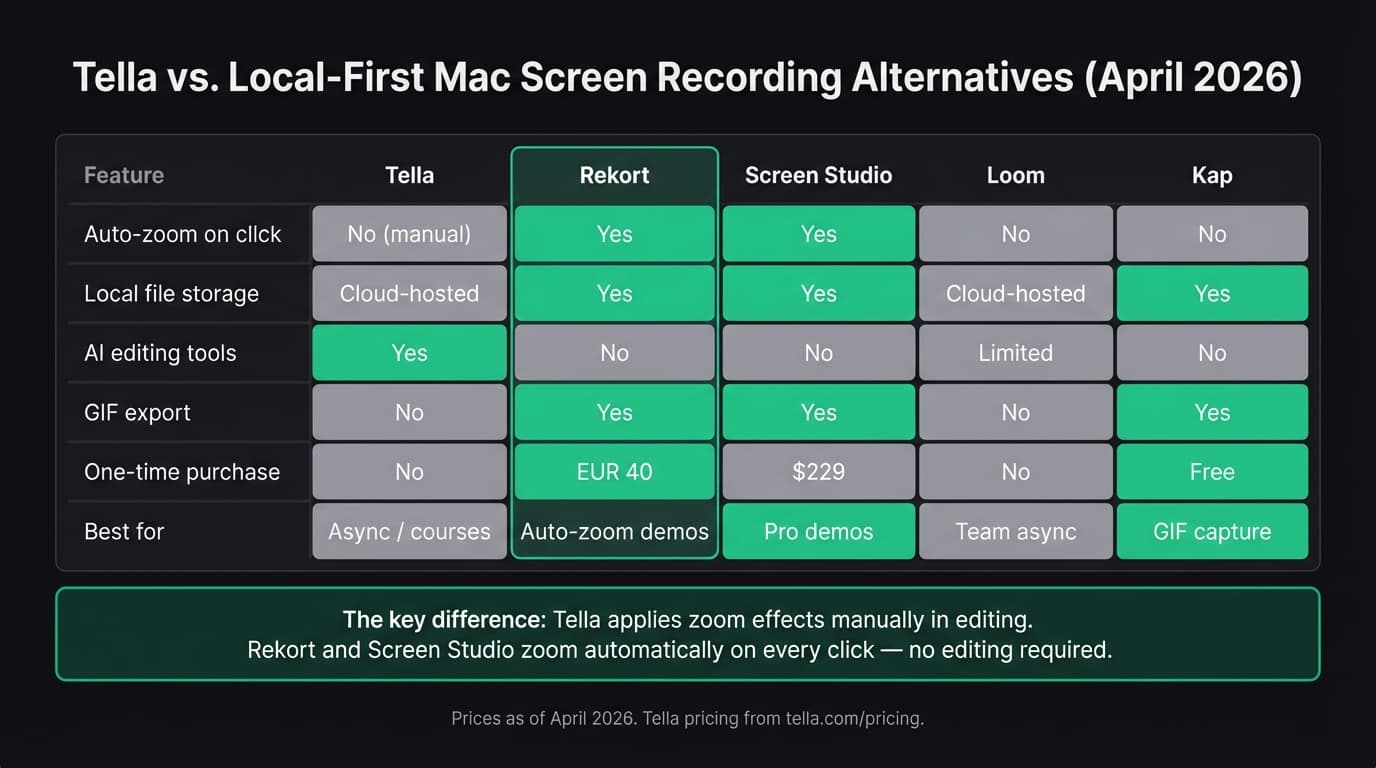
Tella is a cloud-based screen recorder that hosts your videos and gives you a share link. That model works well for async communication and course content, but it comes with trade-offs: subscription pricing starting around $12/month (as of April 2026, via tella.com/pricing), recordings stored on Tella's servers, and zoom effects that are manual — not automatic on click.
If any of those trade-offs are driving you to look elsewhere, this guide covers five alternatives — what each does well, what it doesn't, and who it's for.
Full disclosure: we built Rekort, one of the five tools below.
Why people look for Tella alternatives#
Cloud dependency. Tella is built around cloud storage and share links. Your recordings live on Tella's servers. If you're recording internal workflows, confidential product details, or client-sensitive content, that's a meaningful constraint. Most alternatives on this list keep files local by default.
Subscription pricing. Tella has no permanent free plan — after the 7-day trial, you're on a paid plan. For occasional screen recording, a one-time purchase or free tool is more practical.
No auto-zoom on click. Tella lets you manually add zoom effects during editing. That's different from automatic zoom: with auto-zoom, every click during the recording triggers a zoom in the output, without any post-recording editing. If you're making demos where click targets need to be visible, manual zoom means editing time after every recording.
Mac-native preference. Tella is a cross-platform tool (Mac, Windows, browser). Some Mac users prefer native apps that feel at home in the OS and don't depend on Electron or browser runtimes for smooth performance.
All five tools at a glance#
| Tool | Price | Local files | Auto-zoom | GIF export | Best for |
|---|---|---|---|---|---|
| Rekort | $79 lifetime | Yes | Yes | Yes | Auto-zoom demos, local-first |
| Screen Studio | $29/mo or $108/yr | Yes | Yes | Yes | Full production suite |
| Loom | From $12.50/user/mo | No | No | No | Async team video |
| Kap | Free | Yes | No | Yes | GIF capture |
| QuickTime | Free (built-in) | Yes | No | No | Quick, no-frills captures |
Continue reading
A Simpler Alternative
Auto-zoom on click, focused timeline editing, MP4 & GIF export. $9/month, $49/year, or $79 lifetime.
Rekort#
Price: $9/month, $49/year, or $79 lifetime
Full disclosure: this is our app.
Rekort is a native Mac screen recorder with automatic zoom on click. Select an area, record, and every click zooms in automatically so viewers can see exactly what you're clicking — no editing required. Preview the recording, adjust zoom level and timing, then export as MP4 or GIF.
Where Rekort differs from Tella: recordings stay on your Mac. Nothing uploads to a server. There's no video hosting or share links — you export a file and share it however you normally share files. That's a deliberate trade-off, not a missing feature.
What it does well:
- Auto-zoom on click — the click target zooms in automatically, no manual keyframing
- Recordings save locally; nothing uploads to a third-party server
- System audio and microphone capture without extra setup
- MP4 and GIF export
- One-time purchase option
Where it falls short:
- No video hosting or share links
- No camera overlay or custom backgrounds
- No AI editing tools (transcript, filler word removal)
- No clip-by-clip recording or multi-shot workflows
- Mac only
If you're making product demos or tutorials where auto-zoom matters and you'd rather own the file, Rekort is the faster path. If you need branded hosting, AI captions, or clip editing, you'll want something else.
Screen Studio#
Price: $29/month or $108/year
Screen Studio is the most complete Mac screen recorder for polished video output. It has auto-zoom on click, camera overlay, custom backgrounds, zoom animations, and export options that cover most demo and tutorial needs.
The feature set is closer to what Tella offers than any other local-first tool — both have smooth zoom effects, both can add polish to a recording without a separate video editor. The main differences: Screen Studio is Mac-only and saves files locally, while Tella is cross-platform and cloud-hosted. Screen Studio also has more advanced camera and background controls.
What it does well:
- Auto-zoom on click (automatic, not manual)
- Camera bubble overlay and background customization
- Native Mac app, recordings stay local
- High-quality MP4 and GIF export
Where it falls short:
- $108/year is steep for occasional use
- No video hosting or share links
- No AI editing or transcript features
- Mac only
Screen Studio is the right pick if you make polished product videos regularly and want the best auto-zoom on the market. For lighter use, the price is harder to justify.
Loom#
Price: Free (limited) / from $12.50/user/month
Loom is the closest direct competitor to Tella in terms of use case: both are built for async video communication with cloud hosting and share links. Loom's free plan caps recordings at 5 minutes and 25 total videos. Paid plans start at $12.50/user/month (as of April 2026, via Atlassian's pricing page).
Where Loom falls short compared to Tella: no zoom effects (manual or automatic), less polished editing tools, and the platform is now owned by Atlassian — which matters if you're trying to avoid adding to that stack. Where Loom wins: broader integrations, a longer track record, and a free tier with limited use.
Neither Loom nor Tella keeps recordings local by default.
What it does well:
- Easy async sharing with viewer comments
- Familiar to most teams already
- Free tier covers basic use cases
- Works on Mac, Windows, Chrome extension
Where it falls short:
- No auto-zoom or manual zoom effects
- Cloud-only recording storage
- Free plan is tightly capped
- No GIF export
If you're already using Loom and want more polish (zoom, backgrounds, AI editing), Tella is probably the upgrade. If you're coming from Tella and want local files, look at Rekort or Screen Studio instead.
Kap#
Price: Free (open-source)
Kap is a free, open-source Mac screen recorder built primarily for GIF export. It records your screen, lets you trim, and exports as GIF or MP4. There's no camera overlay, no zoom, no AI editing — just a clean, fast recorder that saves files locally.
If the main thing you want to replace in Tella is the subscription cost and cloud storage, and you don't need zoom or AI features, Kap gets the job done for free. It's particularly good for GitHub READMEs, PR comments, and quick screen captures shared as GIF.
What it does well:
- Free and open-source
- Clean GIF and MP4 export
- Recordings stay local
- Lightweight, fast to use
Where it falls short:
- No auto-zoom or zoom effects
- No camera overlay, backgrounds, or editing
- No AI tools
- No video hosting or sharing workflow
Kap doesn't try to compete with Tella's production features. It's for people who need a fast, free recorder that gets out of the way.
QuickTime Player#
Price: Free (built into macOS)
QuickTime is the zero-friction option. Cmd+Shift+5 opens the Screenshot toolbar, and you can record a selected area with a few clicks. Files save locally to your Mac. There's no subscription, no account, no cloud.
The trade-offs are significant: no zoom (auto or manual), no system audio without a third-party routing tool like BlackHole, no GIF export, no editing. It's a raw screen capture, not a polished demo tool.
If you need Tella because of the polish and sharing features, QuickTime is a step backwards. If you just need a screen capture without a subscription and can handle the limitations, it's already on your Mac.
Which tool is right for you#
You want auto-zoom on click, local files, one-time pricing: Rekort or Screen Studio. Rekort is lighter and cheaper; Screen Studio has more production features.
You want Tella's cloud sharing but less subscription friction: Loom has a free tier and is more widely integrated, though the editing tools are less polished.
You want to capture GIFs locally for free: Kap.
You want the simplest possible recorder, already on your Mac: QuickTime Player.
The core trade-off with Tella is cloud-hosted convenience versus local control. If the cloud hosting is why you use Tella (easy sharing, branded player, viewer analytics), the alternatives here mostly don't replicate that — they save files and you share them yourself. If the cloud hosting is why you're looking to leave, the alternatives here give you local files and more pricing flexibility.
For more context on Mac screen recorders broadly, see our best screen recorder for Mac comparison and our breakdown of Screen Studio alternatives.
Ready to record?
Rekort auto-zooms every click so your screen recordings look professional. No video editing required.
Download for MacmacOS 14+ · $9/month, $49/year, or $79 lifetime
Related Articles
Best Screen Studio Alternatives for Mac: Pick by Workflow (2026)
15 min read
OBS Alternative for Mac: Screen Recording Without the Complexity
10 min read
Cap Alternative for Mac: Auto-Zoom Without the Cloud
8 min read
Cursorful Alternative: Native Mac Auto-Zoom Screen Recording
7 min read
Descript Alternative for Mac: Screen Recording Without the Learning Curve
8 min read