Loom Alternative for Mac: 6 Local-First Screen Recorders Compared
Looking for a Loom alternative for Mac? Compare 6 local-first screen recorders on price, auto-zoom, GIF export, and privacy. Honest comparison.
Loom is a cloud-based screen recorder that uploads every recording to Loom's servers and gives you a share link. That model is useful for async communication, but it comes with trade-offs: a 5-minute cap and 25-recording limit on the free plan, per-seat pricing starting at $12.50/user/month on paid plans, no auto-zoom on click, and no local file output by default.
If any of those trade-offs are why you're looking for a Loom alternative, this guide covers six options — what each does well, where it falls short, and who it's for.
Full disclosure: we built Rekort, one of the six tools on this list.
Why people look for Loom alternatives#
Before comparing tools, it's worth being specific about what's actually driving the search. The reason matters, because different problems have different solutions.
Per-seat pricing. Loom's free plan allows 25 recordings per person, each capped at 5 minutes. Starter is $12.50/user/month and Business is $20/user/month (as of March 2026, via Atlassian's pricing page). For a 10-person team on Business, that's $200/month. One-time pricing looks a lot more attractive at that scale.
Cloud-only storage. Every Loom recording goes to Loom's servers. There's no local-only export mode. For recordings that contain confidential product details, customer data, or internal security processes, that's a meaningful constraint.
No auto-zoom on click. Loom records your screen as-is. If you're demoing a web app on a 1440p display, small buttons stay small. You can't zoom into clicks without recording again or editing the video afterward.
Atlassian acquisition. Atlassian acquired Loom in 2023 and has been migrating billing to Atlassian administration. For teams already wary of Atlassian sprawl (Jira, Confluence, Trello, Bitbucket), adding Loom to that stack is a deliberate choice.
No GIF export. Loom exports MP4 only. GIF output for GitHub READMEs, PR comments, or Slack requires a separate conversion step.
All six tools at a glance#
| Tool | Price | Local files | Auto-zoom | GIF export | Best for |
|---|---|---|---|---|---|
| Rekort | $79 lifetime | Yes | Yes | Yes | Auto-zoom demos, local storage |
| Screen Studio | $29/mo or $108/yr | Yes | Yes | Yes | Full production suite |
| Cap | Free / from $9/mo | Yes (or self-host) | No | No | Open-source, async sharing |
| Kap | Free | Yes | No | Yes | GIF capture |
| OBS Studio | Free | Yes | No | No | Streaming, multi-source |
| QuickTime | Free (built-in) | Yes | No | No | Quick informal captures |
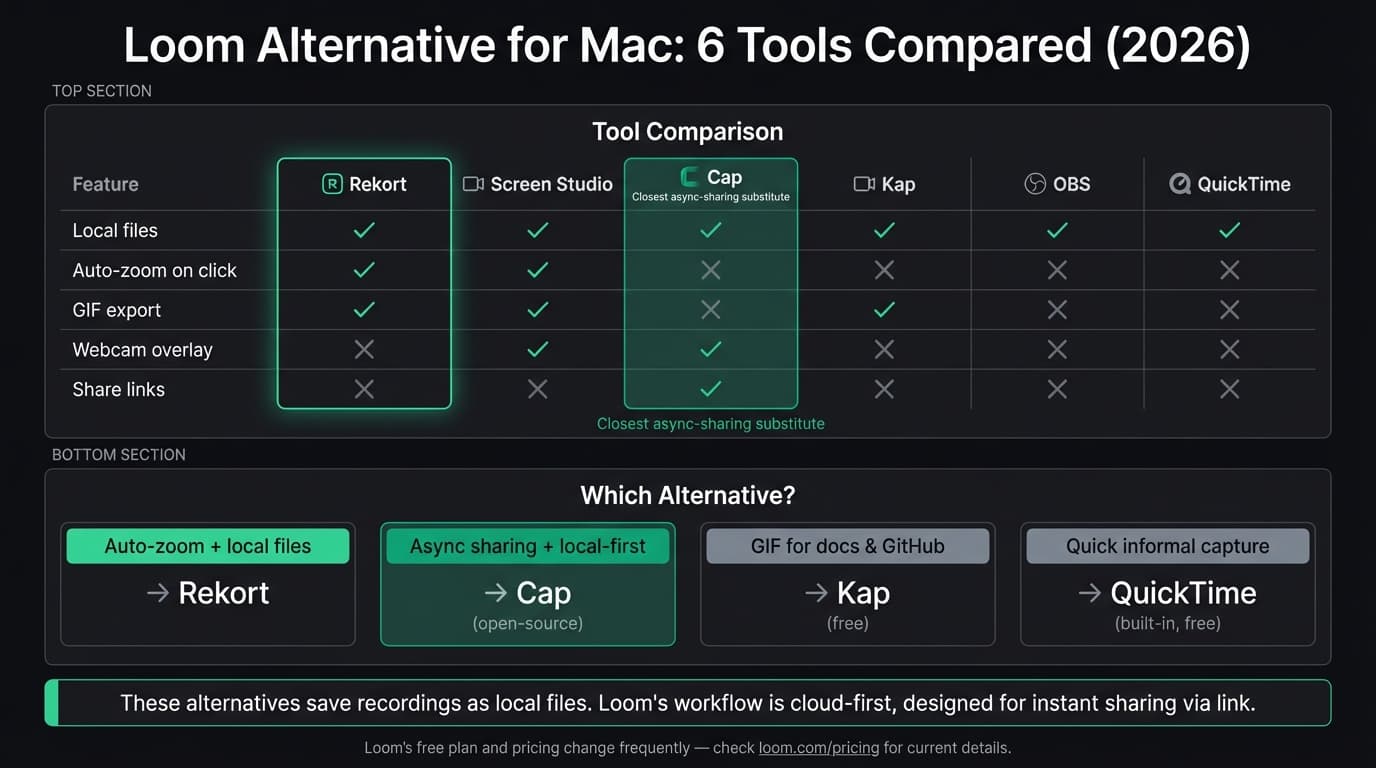
Every tool on this list saves files locally. None upload your recordings without your consent.
Continue reading
A Simpler Alternative
Auto-zoom on click, focused timeline editing, MP4 & GIF export. $9/month, $49/year, or $79 lifetime.
Rekort#
Price: $9/month, $49/year, or $79 lifetime
Full disclosure: this is our app.
Rekort is a native Mac screen recorder with automatic zoom on click. You select an area, record your screen, and every click automatically zooms in so viewers can see exactly what you're interacting with. Preview the recording with zoom applied, adjust zoom level and timing, then export as MP4 or GIF.
What it does well:
- Auto-zoom on click — the click target zooms in automatically during playback, no editing required
- Recordings save locally; nothing uploads to a third-party server
- System audio and microphone capture without extra setup
- MP4 and GIF export
- Adjustable zoom level, duration, and easing in the preview
- Native Swift/SwiftUI app — not Electron, not a web wrapper
- One-time pricing. No per-seat fees. $79 covers the app permanently.
Where it falls short:
- Webcam overlay is available locally. Loom's defining advantage is the hosted video page, comments, analytics, and team library around the camera bubble.
- No share links or viewer comments. There's no Rekort cloud; you share the file directly.
- No async collaboration features. No emoji reactions, timestamp comments, or viewing analytics.
- Color and image backgrounds, padding, rounded corners, and shadow are available.
- macOS 14+ required.
Who should use it: Developers, product teams, and DevRel who record demos, bug reproductions, and tutorial walkthroughs and want auto-zoom without a cloud subscription. If the reason you're leaving Loom is the per-seat pricing or cloud storage, Rekort covers the recording workflow at a fixed cost.
Who shouldn't: Anyone whose primary use case is async video messaging with webcam overlay and viewer engagement features. Loom's share-link-and-comment model is genuinely good for that workflow. If you want to replace Loom for async communication specifically, Cap (below) is the more direct substitute.
Screen Studio#
Price: $29/month or $108/year (as of March 2026)
Screen Studio is the most capable local Mac screen recorder available. It records your screen, adds smooth auto-zoom on every click, supports webcam overlay with background removal, and lets you customize backgrounds, padding, and cursor effects. The output looks like a professionally edited video without any editing.
What it does well:
- Best-in-class auto-zoom with configurable camera movements
- Webcam overlay with background removal — closer to Loom's webcam bubble
- Custom backgrounds, rounded corners, shadows
- System audio and microphone capture
- GIF, MP4, and WebM export
- Cursor effects: highlight ring, click animations, size adjustment
Where it falls short:
- Expensive for occasional use. Current pricing is $29/month or $108/year, a significant jump from Loom's free tier.
- No async sharing features. Like Rekort, you export a file and share it yourself — there's no built-in share link.
- No viewer comments or engagement analytics.
- Export can be slow on longer recordings.
Who should use it: Anyone switching from Loom who makes polished product videos daily and needs webcam overlay plus auto-zoom. Screen Studio is the feature-complete replacement if budget allows.
Who shouldn't: Teams who are switching from Loom primarily to reduce per-seat costs. At $108/year/person, Screen Studio is more expensive than Loom Business for anyone who leaves before ~11 months.
Cap#
Price: Free plan available; paid plans from $9/month for cloud features
Cap is an open-source screen recorder built as a direct Loom alternative. Like Loom, it supports quick share links and webcam overlay. Unlike Loom, it saves recordings locally by default and lets you self-host the sharing infrastructure if you want full data control.
What it does well:
- Open-source (available on GitHub) — you can inspect and self-host
- Recordings save locally by default
- Webcam overlay built in
- Share links work like Loom: send a URL, viewer watches in browser
- Free tier with no recording time cap or video count limit
- Available on Mac and Windows
Where it falls short:
- No auto-zoom on click
- No GIF export
- The viewer comment and engagement analytics features are less mature than Loom's
- Cloud sharing requires Cap's servers (or your own self-hosted instance)
- Newer project — smaller community and fewer integrations than Loom
Who should use it: Teams who want Loom's async sharing model but prefer open-source software with local file storage. If the webcam-plus-share-link workflow is what you're keeping, Cap replicates it without the Atlassian subscription.
Kap#
Price: Free and open-source
Kap is a lightweight menu-bar recorder that focuses on GIF export. It records screen areas and converts them to GIF, MP4, WebM, or APNG. It doesn't have webcam overlay, share links, or auto-zoom — but it's free, fast, and makes great GIFs.
What it does well:
- Free with no restrictions
- GIF export with size optimization
- Clean menu-bar interface — minimal friction for quick captures
- Plugin system for upload targets (Giphy, Imgur, etc.)
- Exports to multiple formats
Where it falls short:
- No webcam overlay
- No system audio capture
- No auto-zoom
- No async sharing features
- Best for short clips (30 seconds or under)
Who should use it: Developers capturing short interactions for GitHub issues, pull requests, or documentation. If you used Loom for 10-15 second UI demonstrations and just need the recording, Kap is the fastest free path. See our GIF screen recorder for Mac guide for a full comparison of GIF tools.
OBS Studio#
Price: Free and open-source
OBS is the standard tool for live streaming and multi-source recording. It records locally, captures system audio natively on macOS 13+, and supports multiple video/audio sources in a single scene. It has nothing in common with Loom's use case, but it's genuinely powerful for what it does.
What it does well:
- Free and open-source, no restrictions
- Records at any resolution and frame rate
- Multi-source layouts: screen + webcam + images + text overlays
- System audio capture on macOS 13+
Where it falls short:
- No auto-zoom on click
- Steep learning curve — designed for streaming, not quick demos
- No async sharing or share links
- No GIF export
- No built-in video editor
Who should use it: Streamers or educators running live sessions who happen to also need local recordings. For most people switching from Loom, OBS is overcomplicated for the job.
QuickTime Player#
Price: Free (comes with macOS)
QuickTime is on every Mac. File > New Screen Recording, pick your area, hit record. It exports .mov files locally and requires zero setup.
What it does well:
- Already installed on your Mac
- Records full screen or selected area
- Microphone audio works reliably
- No recording time limits, no account required
- Zero cost
Where it falls short:
- No system audio without installing BlackHole and routing through Audio MIDI Setup
- No auto-zoom
- No GIF export
- No webcam overlay
- Trim only — no mid-clip editing
Who should use it: Anyone who needs a quick, informal capture for internal use and doesn't need zoom, system audio, or GIF export. Bug reports, quick reference notes, internal Slack clips.
Loom does these things well#
Every post comparing Rekort to a competitor should be honest about what the competitor gets right, and Loom has real strengths worth acknowledging.
Async communication. Loom's share-link model is genuinely good for team communication. Send a link, viewer watches in the browser without downloading anything, leaves timestamp comments, reacts with emoji. That workflow is fast and it works.
Viewer analytics. Loom Business shows you who watched, for how long, and where they dropped off. No local-first alternative on this list replicates that feature.
AI features. Loom Business with AI adds transcription, filler-word removal, auto-generated titles and summaries. Useful for customer-facing recordings.
Webcam bubble. Loom's floating webcam overlay is well-implemented. Screen Studio and Cap both have webcam overlay, but Loom's has been refined over years of iteration.
If those features are why you're using Loom, the alternatives above won't replace them. The closest substitute for async video with webcam is Cap (local-first, open-source) or Screen Studio (better auto-zoom, local files, more expensive).
How to pick#
"I want local files and auto-zoom on click." Rekort ($9/month, $49/year, or $79 lifetime) or Screen Studio ($108/year). Both save locally, add automatic zoom, and support a webcam overlay. Screen Studio adds camera-background removal and deeper cursor polish; Rekort offers focused segment editing and a lower lifetime price. For a detailed head-to-head, see our Rekort vs Loom comparison.
"I want Loom's async sharing model but local-first storage." Cap. Open-source, webcam overlay, local files by default, optional self-hosted sharing.
"I need GIFs for GitHub and docs." Kap. Free, focused, outputs GIFs directly. For GIFs with auto-zoom applied, Rekort exports GIFs with zoom already baked in.
"I stream or need multi-source layouts." OBS Studio. Nothing else on this list covers that.
"I need a quick informal capture and I'm not paying for software." QuickTime. It's already on your Mac.
The right Loom alternative depends on which part of Loom you actually need. If it's the async sharing model, Cap is the closest replacement. If it's clean screen recordings with zoom, Rekort or Screen Studio. If it's neither and you just need a local recording, QuickTime covers it for free.
For a broader comparison of Mac screen recorders, see our best screen recorder for Mac guide.
Ready to record?
Rekort auto-zooms every click so your screen recordings look professional. No video editing required.
Download for MacmacOS 14+ · $9/month, $49/year, or $79 lifetime
Related Articles
Best Screen Studio Alternatives for Mac: Pick by Workflow (2026)
15 min read
OBS Alternative for Mac: Screen Recording Without the Complexity
10 min read
Cap Alternative for Mac: Auto-Zoom Without the Cloud
8 min read
Cursorful Alternative: Native Mac Auto-Zoom Screen Recording
7 min read
Descript Alternative for Mac: Screen Recording Without the Learning Curve
8 min read