Rekort vs Screen Studio: Focused Auto-Zoom or Full Production Suite? (2026)
Rekort and Screen Studio both auto-zoom on click. Here's how they compare on pricing, features, webcam overlay, and when each is the better choice.
Rekort and Screen Studio are both Mac screen recorders that automatically zoom into your clicks during playback. The core idea is the same: record your screen, and every click zooms in to show exactly what you're interacting with. The differences are in scope, pricing, and how much production polish each app adds around that core zoom.
Disclosure: We built Rekort. We've tried to write this comparison honestly, including cases where Screen Studio is the better choice.
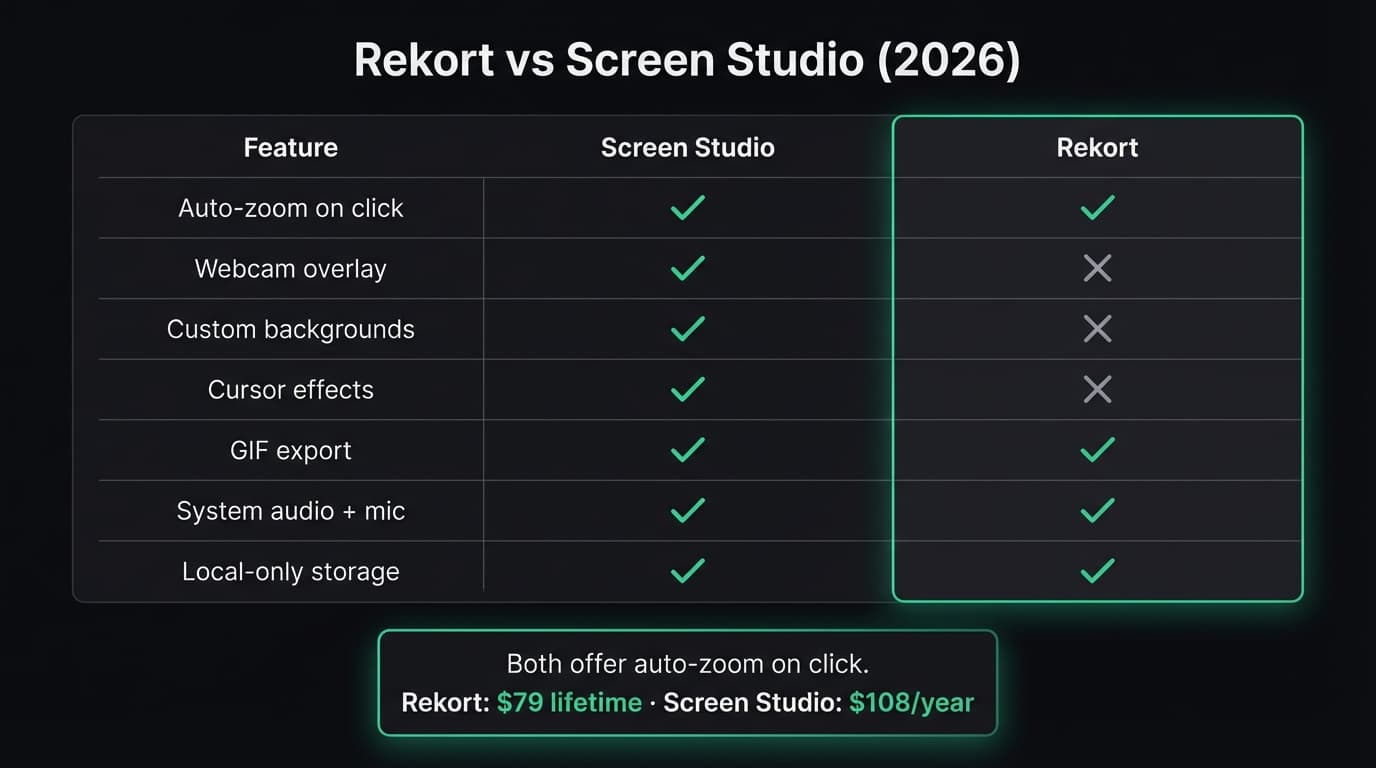
Quick comparison: For a side-by-side feature table, pricing breakdown, and FAQ, see our Screen Studio vs Rekort comparison page.
What Screen Studio is#
Screen Studio is a Mac screen recorder launched by Adam Pietrasiak. It introduced the auto-zoom-on-click workflow that makes raw screen recordings look like professionally edited product videos — no timeline editing, no keyframes.
Beyond auto-zoom, Screen Studio bundles a full production toolkit: webcam overlay with real-time background removal, custom backgrounds and padding, rounded corners, drop shadows, cursor spotlight rings, click animations, and export to MP4, GIF, and WebM. The result is a recording that looks like a marketing asset without touching a video editor.
Screen Studio is macOS-only. Current pricing is $29/month or $108/year. The one-time license at $229 has been discontinued (as of March 2026).
Continue reading
A Simpler Alternative
Auto-zoom on click, timeline editor, MP4 & GIF export. Starting at $9/month or $79 lifetime.
What Rekort is#
Rekort is a native Mac screen recorder focused on auto-zoom on click. Select a recording area, record normally, and every click automatically zooms in so viewers see exactly what you're interacting with. Preview the recording with zoom applied, adjust the zoom level and transition timing, then export as MP4 or GIF.
Rekort focuses on the record-zoom-export loop. It does not add webcam overlay, custom backgrounds, cursor animations, or frame effects. The scope is deliberately narrower — the goal is a fast path from recording to polished output.
Rekort is built with Swift and SwiftUI using native macOS frameworks. Pricing is $9/month or $79 lifetime with one tier — no feature gating, no per-seat fees (as of March 2026).
Auto-zoom quality#
Both apps apply zoom automatically when you click during a recording. You don't need to set keyframes or edit a timeline — the zoom is applied during playback.
Screen Studio uses smooth, cinematic ease-in-out curves that mimic a professional camera pan. The zoom transitions feel polished and deliberate, with fine-grained control over speed and easing in the editor. If you've seen Screen Studio recordings on social media, the zoom quality is a large part of what makes them look professional.
Rekort applies the same automatic zoom on click with adjustable zoom level, duration, and easing curves. You can preview the full recording and tweak zoom timing before exporting. The transitions are clean and effective for product demos and tutorials.
For most use cases — product walkthroughs, bug reproductions, feature demos, tutorial recordings — both produce professional-looking results. Screen Studio's zoom has more polish at the margins, particularly in how the camera movement eases between zoom points. If cinematic-quality motion is important for your specific use case, Screen Studio sets the bar.
Pricing#
Screen Studio moved to subscription-only pricing in 2026 after discontinuing its one-time purchase option. For a detailed cost breakdown over time, see the comparison page.
The pricing question for most users comes down to feature scope: are webcam overlay, custom backgrounds, and cursor effects worth the ongoing subscription cost, or is auto-zoom on click sufficient? If the additional production features go unused, the subscription cost is overhead.
Feature scope#
Screen Studio is a broader product than Rekort. This is not a criticism of either — they made different scope decisions.
Screen Studio includes: webcam overlay with background removal, custom backgrounds with padding and shadows, rounded corners on the recording frame, cursor spotlight rings and click animations, cursor size scaling, multiple export formats with fine-grained quality controls, and a rich settings panel.
Rekort includes: auto-zoom on click, adjustable zoom level and timing, system audio and microphone capture, MP4 and GIF export, and a preview editor for tweaking zoom before export. Local storage only — recordings never leave your machine.
If you use webcam overlay, custom backgrounds, or cursor effects regularly, Screen Studio covers all three. Rekort doesn't have any of these. If you only need the auto-zoom workflow and clean exports, the additional features are capabilities you're paying for but not using.
What Screen Studio does better#
Webcam overlay with background removal. Screen Studio's webcam bubble removes the background in real time without a green screen. It looks polished without setup. No other Mac screen recorder combines auto-zoom with a background-removed webcam in a single app.
Frame effects. Custom backgrounds, rounded corners, drop shadows, and adjustable padding make recordings look like marketing assets. Rekort records and zooms; Screen Studio also frames.
Cursor effects. Spotlight rings, click animations, and cursor size scaling draw attention to what you're doing on screen. Rekort does not have cursor beautification.
Broader export options. Screen Studio exports to MP4, GIF, and WebM with more granular quality and resolution controls.
Established ecosystem. Screen Studio has been available longer, has more community-created templates and presets, and more tutorial content available online.
What Rekort does better#
Pricing. $79 once versus $108/year ongoing. For anyone who records regularly over multiple years, the cost difference is substantial.
Simplicity. Fewer settings means fewer decisions between pressing "record" and getting your export. Rekort's workflow is: select area → record → preview with zoom → adjust timing → export. No background options, no webcam positioning, no cursor effect menus.
GIF export with zoom. Both apps export GIFs, but Rekort's GIF workflow is designed for developer use cases — GitHub READMEs, PR comments, Slack messages — where a zoomed GIF communicates more than a raw screen capture.
Native performance. Rekort is built with Swift and SwiftUI using native macOS frameworks, with tight integration on Apple Silicon.
Local-first privacy. Recordings stay on your machine. No cloud storage, no account creation, no telemetry on your recording content.
Both apps solve the same core problem — making screen recordings look polished by automatically zooming into clicks. If auto-zoom is the main feature driving your decision, the question is whether the additional production features in Screen Studio justify the ongoing subscription cost for your specific workflow.
For a broader comparison including Loom, OBS, Kap, and ScreenFlow, see our Screen Studio alternative guide. For a direct comparison with Loom's async approach, see Rekort vs Loom. For context on screen recording on Mac in general, see best screen recorder for Mac.
Ready to record?
Rekort auto-zooms every click so your screen recordings look professional. No video editing required.
Download for MacmacOS 14+ · From $9/month or $79 lifetime
Related Articles
Screen Studio Alternative: 5 Options Worth Trying (2026)
14 min read
Cap Alternative for Mac: Auto-Zoom Without the Cloud
8 min read
Cursorful Alternative: Native Mac Auto-Zoom Screen Recording
7 min read
Descript Alternative for Mac: Screen Recording Without the Learning Curve
8 min read
FocuSee Alternative for Mac: Lighter Auto-Zoom Screen Recording
8 min read