Rekort vs Tella: Native Auto-Zoom or Web-Based Creator Studio? (2026)
Rekort is a native Mac recorder with auto-zoom on click. Tella is a web-based recording studio for creators. Here's how they compare and who each is for.
Rekort and Tella are both screen recording tools, but they approach the problem from different directions. Rekort is a native Mac app focused on auto-zoom on click — record your screen, and every click automatically zooms in during playback. Tella is a web-based recording and editing studio designed for content creators, course builders, and community leaders who need layouts, subtitles, branding, and polished video output from a single tool.
Disclosure: We built Rekort. We've tried to write this honestly, including cases where Tella is the better choice.
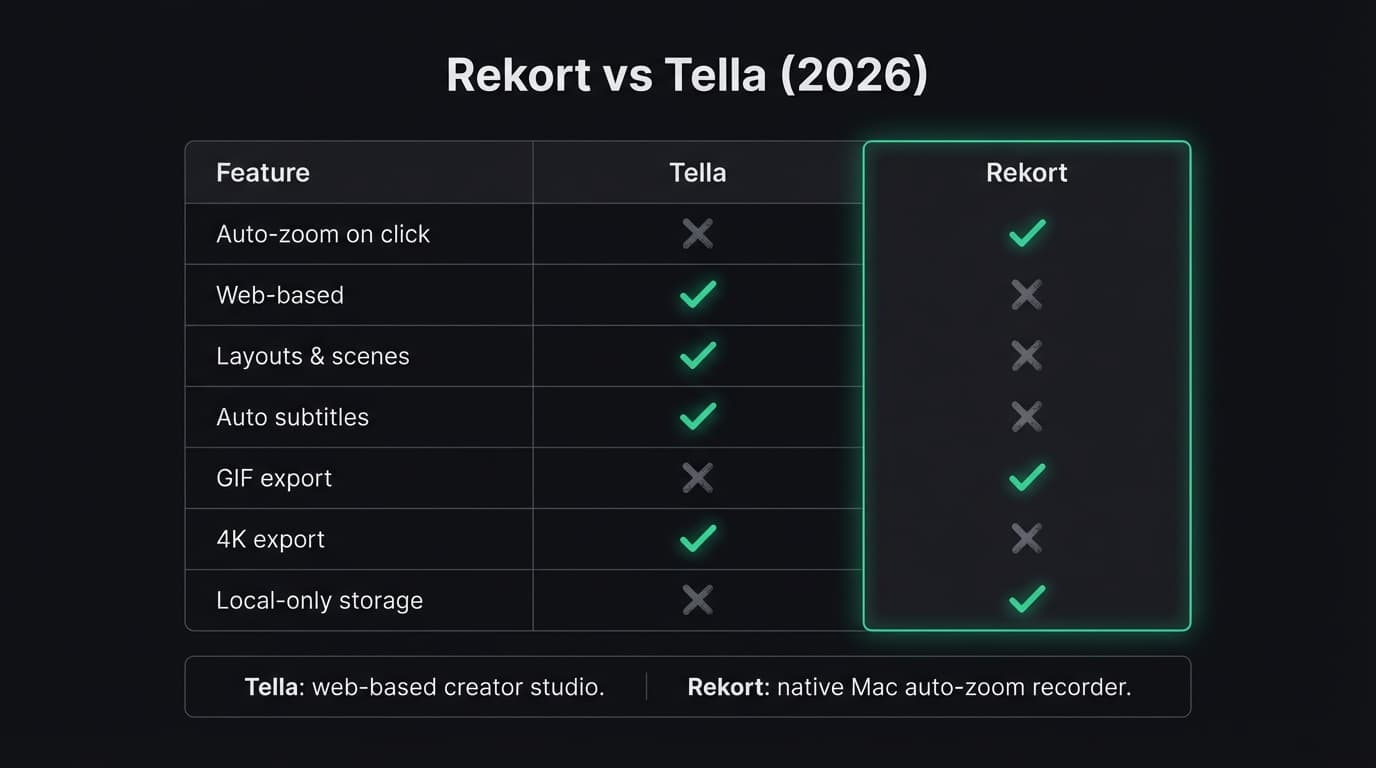
Quick comparison: For a side-by-side feature table, pricing breakdown, and FAQ, see our Tella vs Rekort comparison page.
What Tella is#
Tella is a web-based screen recording and video editing platform built for creators. It combines recording and editing in one app — you record your screen, camera, or both, then edit the result with layouts, backgrounds, subtitles, and transitions without leaving the tool.
Tella runs in the browser on any platform (Mac, Windows, Linux, Chromebook) and also offers a dedicated Mac app and Chrome extension. The platform is designed around a content creation workflow: speaker notes, multiple scenes, custom branding, and clip management. You can record a product walkthrough, add auto-generated subtitles, apply your brand colors, and export in 4K — all within Tella.
Tella has zoom effects you can apply during editing, but these are manual effects added in post-production rather than the automatic zoom-on-every-click behavior found in Screen Studio and Rekort. Pricing starts with a free plan (10 videos, 5-minute limit, Tella branding), then Pro at $19/month or $15/month annually, and Premium at $49/month (as of March 2026).
Continue reading
A Simpler Alternative
Auto-zoom on click, timeline editor, MP4 & GIF export. Starting at $9/month or $79 lifetime.
What Rekort is#
Rekort is a native Mac screen recorder focused on auto-zoom on click. Select a recording area, record normally, and every click automatically zooms in so viewers see exactly what you're interacting with. Preview the recording with zoom applied, adjust the zoom level and transition timing, then export as MP4 or GIF.
Rekort focuses on the record-zoom-export loop. It does not add webcam overlay, custom backgrounds, subtitles, layouts, or branding controls. The scope is deliberately narrow — the goal is a fast path from recording to polished output where every click is emphasized automatically.
Rekort is built with Swift and SwiftUI using native macOS frameworks. All recordings stay on your machine — no cloud storage, no account creation. Pricing is $9/month or $79 lifetime with one tier, no feature gating (as of March 2026).
Native app vs web-based#
This is the fundamental architectural difference between the two tools.
Tella runs in the browser and the cloud. Your recordings are stored on Tella's servers, edits happen in their web editor, and the final export is rendered server-side. This means you can access your recordings from any device, share links directly, and collaborate with teammates. The tradeoff is that your recordings leave your machine, and you need an internet connection for most of the workflow.
Rekort is a native Swift/SwiftUI app that runs entirely on your Mac. Recording, preview, zoom processing, and export all happen locally. Nothing is uploaded, no account is required, and the app works offline. The tradeoff is that there's no sharing link, no collaboration, and no cross-platform access.
For developers and PMs who record product demos and bug reproductions on their Mac and share exports via Slack, GitHub, or email, local processing is often preferred. For content creators who need to access recordings across devices, share preview links with stakeholders, or collaborate on edits, the cloud-based approach is more practical.
Auto-zoom on click vs manual zoom effects#
This is the core feature difference that separates the two tools' workflows.
Rekort applies zoom automatically. Every click during your recording becomes a zoom point during playback — no editing, no keyframes, no manual adjustments needed. You record, the app detects your clicks, and the exported video zooms in on each one. You can adjust the zoom level and transition timing in the preview, but the zoom points are placed automatically.
Tella has zoom effects you can add during editing. You select a portion of the recording, apply a zoom, and position it where you want. This gives you creative control over which moments get zoomed and how the zoom looks, but it requires manual work for each zoom point. If your recording has 30 clicks, applying zoom to each one is a meaningful time investment compared to Rekort's automatic approach.
For software product demos where you want every click emphasized — walking through a UI, demonstrating a workflow, reproducing a bug — automatic zoom on click saves significant editing time. For content where you want selective zoom on specific moments while leaving other clicks unzoomed, Tella's manual approach gives you that control.
Pricing and audience#
The pricing reflects different target users and different feature scopes.
Tella offers a free plan with 10 videos, a 5-minute limit per video, and Tella branding on exports. Pro costs $19/month ($15/month on the annual plan, which works out to $180/year). Premium costs $49/month and adds features like custom domains and advanced analytics (as of March 2026).
Rekort offers a free trial, then $9/month or $79 lifetime. One tier, all features, no per-seat pricing.
Tella's pricing includes substantially more features — subtitles, layouts, branding, cloud storage, sharing links, 4K export. Whether those features justify the ongoing cost depends entirely on whether you use them. If you need a recording-and-editing studio with creator tools, Tella's pricing covers a broad feature set. If you need auto-zoom on click and clean exports, the additional capabilities are cost you're carrying without using.
What Tella does better#
Recording and editing in one tool. Tella combines recording with a full editing workflow — layouts, transitions, subtitles, scene management. You can produce a polished video without ever opening a separate editor. Rekort handles recording and zoom; anything beyond that requires another tool.
Auto subtitles. Tella generates subtitles automatically and lets you style them to match your brand. For course content, social media videos, and accessible content, this is a significant time saver. Rekort does not generate subtitles.
Cross-platform access. Tella works on any platform with a browser. Record on Mac, edit on Windows, share a link with a teammate on Linux. Rekort is macOS 14+ only.
Custom branding. Brand colors, logos, custom backgrounds, and consistent visual identity across all your recordings. For teams producing customer-facing content, this keeps everything on-brand without manual work per video.
Layouts and scenes. Screen-only, camera-only, side-by-side, picture-in-picture — Tella lets you switch between layouts during recording or editing. Rekort records the screen and zooms; there are no layout options.
Free tier. Tella's free plan lets you create 10 videos with a 5-minute limit before paying anything. Rekort has a free trial but no ongoing free tier.
What Rekort does better#
Auto-zoom on click. This is the core differentiator. Rekort automatically zooms into every click during playback with no manual editing. Tella has zoom effects, but they require manual placement on each moment you want to zoom. For product demos and tutorials with many click interactions, automatic zoom saves substantial editing time.
Pricing for long-term use. $79 once versus $180/year (Tella Pro annual). For anyone recording regularly over multiple years, the cost difference compounds significantly.
Simplicity. Rekort's workflow is: select area, record, preview with zoom, adjust timing, export. No layouts to choose, no scenes to manage, no branding to configure. If you want to go from recording to polished output with minimal decisions, the narrower scope is an advantage.
GIF export with zoom. Rekort exports GIFs with auto-zoom already applied — ready for GitHub READMEs, PR comments, and Slack messages. Tella does not export to GIF.
Local-first privacy. Recordings stay on your machine. No cloud upload, no account creation, no telemetry on your recording content. For companies with sensitive product UIs or pre-release features, local-only processing avoids the question of where your recordings are stored.
Native performance. Rekort is built with Swift and SwiftUI using native macOS frameworks. No dependency on browser tab performance or network speed during recording.
For a comparison with Screen Studio's auto-zoom and production features, see our Screen Studio alternative guide. For a direct comparison with Loom's async approach, see Rekort vs Loom. For context on screen recording on Mac in general, see best screen recorder for Mac.
Ready to record?
Rekort auto-zooms every click so your screen recordings look professional. No video editing required.
Download for MacmacOS 14+ · From $9/month or $79 lifetime
Related Articles
Screen Studio Alternative: 5 Options Worth Trying (2026)
14 min read
Cap Alternative for Mac: Auto-Zoom Without the Cloud
8 min read
Cursorful Alternative: Native Mac Auto-Zoom Screen Recording
7 min read
Descript Alternative for Mac: Screen Recording Without the Learning Curve
8 min read
FocuSee Alternative for Mac: Lighter Auto-Zoom Screen Recording
8 min read