Rekort vs Cap: Auto-Zoom Recording or Open-Source Screen Sharing? (2026)
Rekort adds auto-zoom on click to screen recordings. Cap is a free, open-source recorder with share links. Here's how they compare and when each is the better choice.
Rekort and Cap are both screen recorders for Mac, but they solve different problems. Rekort automatically zooms into your clicks during playback, turning raw recordings into polished demos without editing. Cap is a free, open-source recorder built around fast recording and instant sharing via cloud links. One focuses on how the recording looks; the other focuses on how quickly you can share it.
Disclosure: We built Rekort. We've tried to write this honestly, including cases where Cap is the better choice.
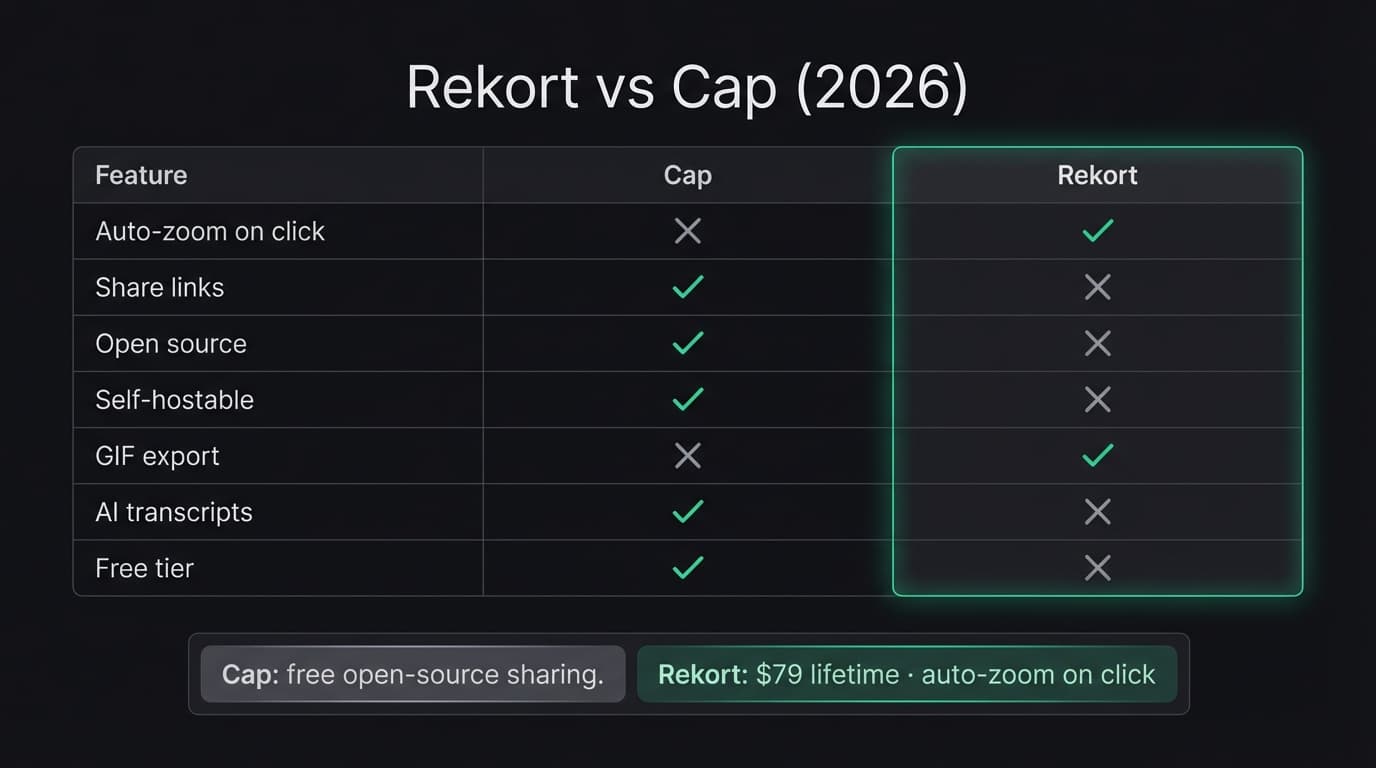
Quick comparison: For a side-by-side feature table, pricing breakdown, and FAQ, see our Cap vs Rekort comparison page.
What Cap is#
Cap is an open-source screen recorder available on Mac and Windows. It has two recording modes: Instant Mode, which auto-uploads your recording and gives you a shareable link immediately, and Studio Mode, which records locally in up to 4K for offline editing and export.
Cap's sharing workflow is its core strength. Record your screen, get a link, share it — with viewer comments, AI-generated titles, transcripts, summaries, and chapters included. It's designed as a direct Loom alternative, and it includes a Loom video importer for teams migrating away from Loom. Cap is GDPR compliant and can be self-hosted with your own S3 storage and custom domain.
Cap is free for personal use with unlimited recordings. The Desktop License costs $58 lifetime or $29/year and unlocks Studio Mode with commercial usage rights. Cap Pro at $8.16/month (annual) or $12/month adds unlimited cloud storage, AI features, custom domains, and team spaces (as of March 2026).
Continue reading
A Simpler Alternative
Auto-zoom on click, timeline editor, MP4 & GIF export. Starting at $9/month or $79 lifetime.
What Rekort is#
Rekort is a native Mac screen recorder focused on auto-zoom on click. Select a recording area, record normally, and every click automatically zooms in so viewers see exactly what you're interacting with. Preview the recording with zoom applied, adjust the zoom level and transition timing, then export as MP4 or GIF.
Rekort does not have share links, webcam overlay, cloud storage, or AI-generated summaries. The scope is narrower by design — the goal is a fast path from recording to a polished, zoomed output file that you share however you prefer.
Rekort is built with Swift and SwiftUI using native macOS frameworks. Pricing is $9/month or $79 lifetime with one tier — no feature gating, no per-seat fees (as of March 2026).
Auto-zoom vs share links#
This is the fundamental difference between the two tools. They optimize for different parts of the recording workflow.
Rekort optimizes for how the recording looks. Every click automatically zooms in, drawing attention to what you interacted with. The output is a polished MP4 or GIF that looks like you manually edited zoom keyframes — without touching a timeline. You get the file and share it however you want: drag into Slack, attach to an email, embed in a README.
Cap optimizes for how quickly the recording reaches your audience. Record, and you immediately have a shareable link. Viewers can watch in the browser and leave comments. AI generates a title, transcript, summary, and chapters. The recording itself is captured as-is — no zoom effects, no post-processing on the visual output.
If your bottleneck is making clicks visible and recordings look polished, Rekort addresses that. If your bottleneck is the sharing step — getting a link to someone quickly with context and discussion — Cap addresses that.
Open source vs native app#
Cap is fully open-source. You can inspect the code, audit what it does with your data, self-host the entire backend with your own S3 storage, and use a custom domain for share links. For teams with strict data governance requirements, or for users who prefer open-source tools on principle, this is a meaningful advantage that most screen recorders don't offer.
Rekort is a closed-source native Mac app. Recordings never leave your machine — there's no cloud component, no account, no telemetry on recording content. But you can't inspect the source code or self-host anything. The privacy model is "nothing leaves your device" rather than "you can verify exactly what runs."
Both approaches serve privacy, but in different ways. Cap gives you transparency and control over infrastructure. Rekort gives you a local-only architecture with no network dependency.
Pricing#
Cap's free tier is a genuine advantage. You can record unlimited personal-use videos at no cost. No trial period, no watermark limitations on personal recordings. For someone who needs a screen recorder and doesn't want to pay anything, Cap is one of the few options that delivers a complete experience for free.
For commercial use with local recording, Cap's Desktop License at $58 lifetime and Rekort's $79 lifetime are in a similar range — though they deliver different features for that price. Cap gives you 4K local recording and commercial rights. Rekort gives you auto-zoom on click with adjustable timing and GIF export.
What Cap does better#
Free personal use. Cap is free for unlimited personal recordings. No trial expiration, no feature gating on the free tier for personal use. If you need a capable screen recorder and don't want to pay, Cap is a strong option.
Share links with comments. Record and immediately get a link that anyone can open in a browser. Viewers can leave timestamped comments. No file attachments, no "can you download this and open it" friction. For async communication in teams, this is a workflow Rekort doesn't have.
AI-generated context. Cap automatically generates titles, transcripts, summaries, and chapters for recordings. Viewers get context before watching. For internal team communication where recordings pile up, searchable transcripts and summaries save time.
Cross-platform. Cap runs on Mac and Windows. Rekort is macOS only. If your team includes Windows users, Cap covers both.
Open source and self-hostable. You can audit the code, host on your own infrastructure with your own S3 storage, and use a custom domain. For organizations with data sovereignty requirements, this is a capability most commercial screen recorders cannot match.
Loom migration. Cap includes a Loom video importer. If your team is moving away from Loom, Cap provides a direct migration path with a similar share-link workflow.
What Rekort does better#
Auto-zoom on click. This is the core differentiator. Rekort automatically zooms into every click during playback. Cap records the screen as-is with no zoom effects. If you want clicks to be visually emphasized without manual editing, Rekort is built for that and Cap does not offer it.
GIF export with zoom. Rekort exports zoomed recordings as GIFs — ready for GitHub READMEs, PR comments, documentation, and Slack. Cap does not export to GIF.
No account or cloud dependency. Rekort works entirely offline. No account creation, no cloud upload, no share link infrastructure. Record, zoom, export a file. For users who want a tool that works without any network connection, Rekort has no online requirements.
Native performance. Rekort is built with Swift and SwiftUI using native macOS frameworks, with tight integration on Apple Silicon.
Simpler workflow for local output. If your goal is a polished MP4 or GIF file — not a share link — Rekort's workflow is direct: record, preview with zoom, adjust timing, export. No cloud upload step, no link management, no account dashboard.
For a broader look at Loom alternatives including Cap, Rekort, and others, see our Loom alternative guide. For a direct comparison between Rekort and Loom's async workflow, see Rekort vs Loom. For context on screen recording on Mac in general, see best screen recorder for Mac.
Ready to record?
Rekort auto-zooms every click so your screen recordings look professional. No video editing required.
Download for MacmacOS 14+ · From $9/month or $79 lifetime
Related Articles
Screen Studio Alternative: 5 Options Worth Trying (2026)
14 min read
Cap Alternative for Mac: Auto-Zoom Without the Cloud
8 min read
Cursorful Alternative: Native Mac Auto-Zoom Screen Recording
7 min read
Descript Alternative for Mac: Screen Recording Without the Learning Curve
8 min read
FocuSee Alternative for Mac: Lighter Auto-Zoom Screen Recording
8 min read