Rekort vs FocuSee: Mac-Native Simplicity or Cross-Platform AI Features? (2026)
Rekort and FocuSee both auto-zoom on click. Here's how they compare on platform support, AI features, pricing, and when each is the better choice.
Rekort and FocuSee are both screen recorders that automatically zoom into your clicks during playback. The core workflow is similar: record your screen, and every click zooms in to highlight exactly what you're interacting with. The differences are in platform support, AI capabilities, and how much each tool adds around that core auto-zoom feature.
Disclosure: We built Rekort. We've tried to write this honestly, including cases where FocuSee is the better choice.
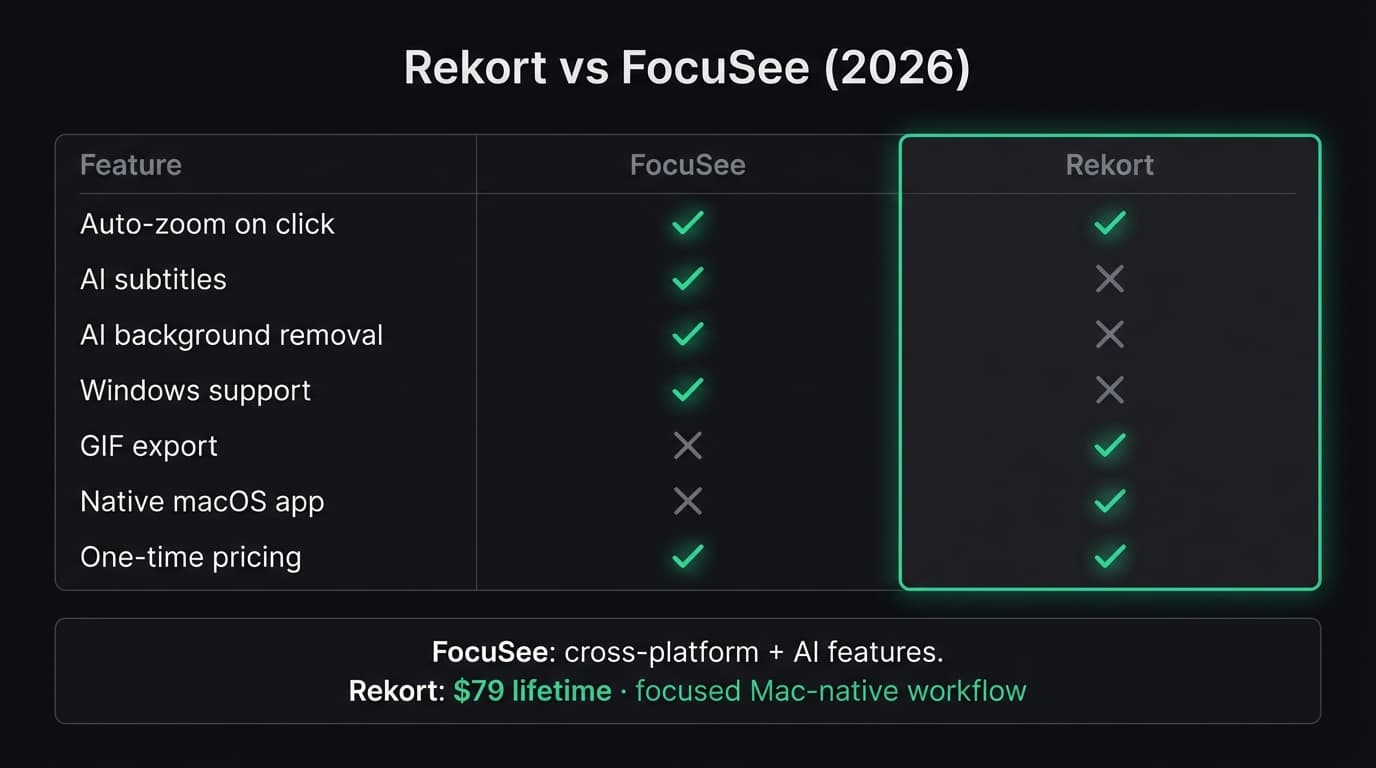
Quick comparison: For a side-by-side feature table, pricing breakdown, and FAQ, see our FocuSee vs Rekort comparison page.
What FocuSee is#
FocuSee is a screen recorder by iMobie that combines auto-zoom with a broad set of AI-powered features. It runs on both macOS and Windows, making it one of the few cross-platform screen recorders with automatic zoom on click.
Beyond auto-zoom, FocuSee includes AI subtitles in 50+ languages, AI background removal, AI audio enhancement with noise reduction and filler word removal, and an AI virtual avatar for camera-free presentations. It also supports smart spotlight to highlight cursor activity, 3D motion effects, mobile device recording via USB (iOS and Android), a built-in teleprompter, and 4K export.
FocuSee's pricing has multiple tiers: Standard at $59.99/year, Advanced at $99.99/year or $199.99 lifetime for up to 5 computers, and a single-computer lifetime license at $79.99 (as of March 2026). The free trial includes one 4K video export.
Continue reading
A Simpler Alternative
Auto-zoom on click, timeline editor, MP4 & GIF export. Starting at $9/month or $79 lifetime.
What Rekort is#
Rekort is a native Mac screen recorder focused on auto-zoom on click. Select a recording area, record normally, and every click automatically zooms in so viewers see exactly what you're interacting with. Preview the recording with zoom applied, adjust the zoom level and transition timing, then export as MP4 or GIF.
Rekort focuses on the record-zoom-export loop. It does not include AI subtitles, AI background removal, virtual avatars, or mobile device recording. The scope is deliberately narrower — the goal is a fast path from recording to polished output without additional complexity.
Rekort is built with Swift and SwiftUI using native macOS frameworks. Pricing is $9/month or $79 lifetime with one tier — no feature gating, no per-seat fees (as of March 2026).
Platform: Mac-only vs cross-platform#
This is a fundamental difference between the two tools.
FocuSee runs on both macOS and Windows. If your team uses a mix of operating systems, or you personally switch between platforms, FocuSee covers both with one tool. Mobile device recording via USB adds iOS and Android screen capture to the mix — useful for app demos and mobile tutorials.
Rekort is macOS-only, built with Swift and SwiftUI. It uses native macOS frameworks — ScreenCaptureKit for capture, AVFoundation for composition and export, vImage for per-frame zoom transforms. The result is tight integration with macOS and Apple Silicon.
If you need to record on Windows or capture mobile device screens, Rekort does not cover those cases. If you're on a Mac and staying on a Mac, the native implementation is a tangible benefit.
AI features#
FocuSee leans heavily into AI. Rekort does not have AI features — this is a deliberate scope decision, not a gap that's being filled.
FocuSee's AI capabilities:
- AI subtitles — Automatic speech recognition in 50+ languages, generating subtitles directly in the recording. No separate captioning tool needed.
- AI background removal — Removes or replaces the webcam background without a green screen.
- AI audio enhancement — Reduces background noise and removes filler words ("um," "uh") from narration.
- AI virtual avatar — An animated avatar that replaces your webcam feed, useful for presentations where you prefer not to appear on camera.
These features are most valuable if you produce narrated tutorials, webinars, or presentations where captions, clean audio, and camera presence matter. If your recordings are silent product demos or bug reproductions, these capabilities go unused.
Rekort's approach: No AI features. Record, zoom, adjust timing, export. The workflow stays focused on screen capture with auto-zoom. If you need subtitles, you'd use a separate captioning tool. If you need noise reduction, you'd process audio externally.
Pricing: tiered vs flat#
FocuSee's pricing structure is unusual for a screen recorder — it has separate Standard and Advanced tiers, where the AI features (subtitles, audio enhancement, virtual avatar) are gated behind the more expensive plan. If you sign up for Standard thinking you're getting the full product, you'll hit upsell prompts when you try to use AI subtitles or filler word removal.
Rekort takes the opposite approach: one tier, one price, all features. There's no decision matrix and no feature you discover is locked after purchase.
The single-computer lifetime prices are close ($79.99 FocuSee vs $79 Rekort), but they buy different things. FocuSee's $79.99 gets you Advanced features on one machine. Rekort's $79 gets you everything with no machine limit. For teams or multi-computer setups, FocuSee's $199.99 lifetime covers up to 5 computers — a reasonable value if you need cross-platform AI features on multiple workstations.
What FocuSee does better#
Cross-platform support. FocuSee runs on both macOS and Windows. If you work across operating systems or need to standardize on one recording tool for a mixed-platform team, FocuSee covers both. Rekort is Mac-only.
AI subtitles. Automatic caption generation in 50+ languages, built directly into the recording workflow. This is a significant time-saver for tutorial creators and educators who need accessible, captioned content. Rekort does not generate subtitles.
AI audio enhancement. Noise reduction and filler word removal produce cleaner narration without external audio processing. For recordings with voiceover, this matters.
Mobile device recording. Capturing an iOS or Android screen via USB and combining it with auto-zoom effects in one tool is a workflow FocuSee supports that Rekort does not address.
AI virtual avatar and teleprompter. For presentations and webinars where you want an on-screen presence without showing your face, or need a script guide while recording, FocuSee includes both. These are niche features but valuable when you need them.
What Rekort does better#
Pricing simplicity. $79 once, all features, no tiers. No decision about Standard vs Advanced, no per-computer licensing. One price, everything included.
Simplicity. Fewer features means fewer settings between pressing "record" and getting your export. Rekort's workflow is: select area, record, preview with zoom, adjust timing, export. No AI configuration, no avatar setup, no subtitle language selection.
Native macOS performance. Rekort is built with Swift and SwiftUI using ScreenCaptureKit and AVFoundation directly, with tight integration on Apple Silicon.
GIF export with zoom. Rekort exports GIFs with auto-zoom already applied — ready for GitHub READMEs, PR comments, and Slack messages without post-processing.
Local-first privacy. Recordings stay on your machine. No cloud storage, no account creation, no telemetry on your recording content.
Both apps solve the same core problem — making screen recordings look polished by automatically zooming into clicks. If auto-zoom is the main feature driving your decision, the question is whether FocuSee's AI capabilities and cross-platform support justify the additional cost and complexity for your specific workflow.
For a broader comparison including Loom, OBS, Kap, and ScreenFlow, see our Screen Studio alternative guide. For a direct comparison with Screen Studio's production suite, see Rekort vs Screen Studio. For context on screen recording on Mac in general, see best screen recorder for Mac.
Ready to record?
Rekort auto-zooms every click so your screen recordings look professional. No video editing required.
Download for MacmacOS 14+ · From $9/month or $79 lifetime
Related Articles
Screen Studio Alternative: 5 Options Worth Trying (2026)
14 min read
Cap Alternative for Mac: Auto-Zoom Without the Cloud
8 min read
Cursorful Alternative: Native Mac Auto-Zoom Screen Recording
7 min read
Descript Alternative for Mac: Screen Recording Without the Learning Curve
8 min read
FocuSee Alternative for Mac: Lighter Auto-Zoom Screen Recording
8 min read