Snagit Alternative for Mac: Record + Screenshot in One App
Snagit costs $39/year and is Windows-first. Here are 5 Mac alternatives for screenshots, annotations, screen recording, and auto-zoom.
Snagit costs $39/year as of 2026 — TechSmith moved to a subscription model in 2025 — and combines screenshots, annotation, and screen recording in one app. The Mac version works, but TechSmith built Snagit for Windows first, and video recordings don't automatically zoom into your clicks.
If you're looking for a Snagit alternative on Mac, the right choice depends on why you use Snagit. Here are five alternatives covering screenshot tools, screen recorders, and apps that handle both.
Full disclosure: we built one of the tools on this list — Rekort. We'll say so directly and tell you where other tools are the better choice.
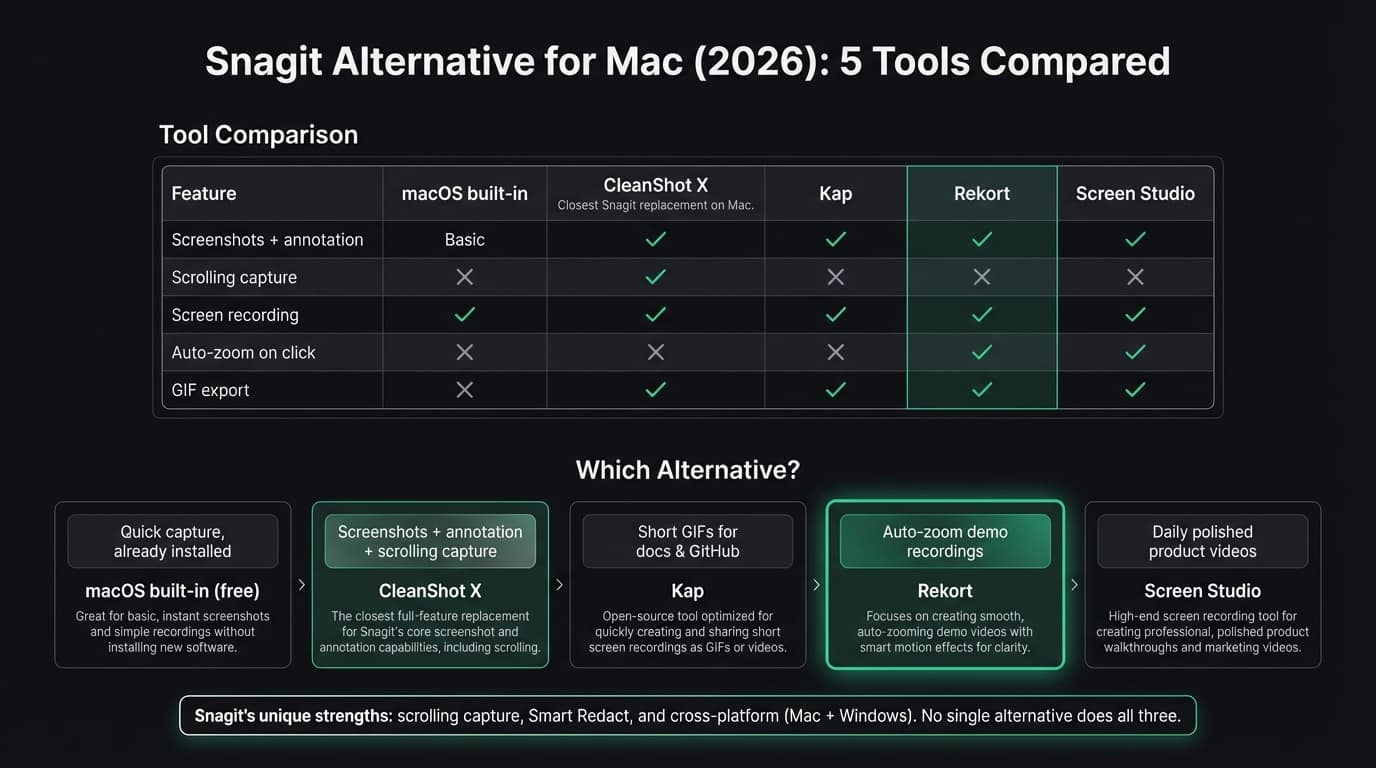
Quick comparison#
| Tool | Price | Screenshots + annotation | Screen recording | Auto-zoom | GIF export |
|---|---|---|---|---|---|
| macOS built-in | Free | Basic | Yes (QuickTime) | No | No |
| CleanShot X | $29 + $19/yr updates | Yes | Yes | No | Yes |
| Kap | Free | No | Yes | No | Yes |
| Rekort | $79 or $9/mo | No | Yes | Yes | Yes |
| Screen Studio | $29/mo or $108/yr | No | Yes | Yes | Yes |
macOS built-in#
Price: Free, built into macOS
Every Mac includes two tools: the Screenshot toolbar (Cmd+Shift+5) for recording and Cmd+Shift+4 for screenshots. Both have been part of macOS for years, and they're already installed.
What it does well:
- Already on your Mac. No download required.
- Screenshots with Cmd+Shift+4 (area) or Cmd+Shift+3 (full screen).
- Markup editor in Preview for basic annotations: arrows, text, shapes, and highlighting.
- Screen recording via the Screenshot toolbar or QuickTime.
- Saves locally, no watermark, no account required.
Where it falls short:
- No scrolling capture. It can't stitch together a full-length webpage screenshot.
- No OCR. You can't copy text out of a screenshot.
- No auto-zoom in video recordings.
- No GIF export.
- Markup is limited. No callout boxes, step numbers, or smart shapes.
Who it's for: Anyone who needs a quick screenshot or basic screen recording without annotation or zoom. If Cmd+Shift+4 already covers your workflow, there's nothing to install.
Who should look elsewhere: Anyone who annotates screenshots regularly, needs to capture long documents, or wants video recordings where viewers can see what's being clicked.
Continue reading
A Simpler Alternative
Auto-zoom on click, focused timeline editing, MP4 & GIF export. $9/month, $49/year, or $79 lifetime.
CleanShot X#
Price: $29 one-time, with $19/year for continued updates (as of March 2026)
CleanShot X is the closest Mac-native Snagit alternative. It replaces the macOS screenshot toolbar with a more capable version that adds scrolling capture, OCR, annotation tools, and screen recording in one app.
What it does well:
- Scrolling capture for full-length webpages and documents.
- OCR: grab text from screenshots without retyping.
- Annotations: arrows, callouts, highlight boxes, step numbers, blur for sensitive data.
- Screen recording to MP4 or GIF with microphone, system audio, and keystroke display.
- Quick Access Overlay lets you annotate immediately after each capture.
- $29 one-time is cheaper than Snagit's $39/year subscription.
- Mac-native, not an Electron app.
Where it falls short:
- No auto-zoom on click in video recordings.
- The one-time license covers one year of updates. After that, the app still works but new macOS features and major updates require a $19/year renewal.
- No searchable library for older screenshots (Snagit has this).
- Mac only, which is a limitation if you also need Windows.
Who it's for: People who primarily use Snagit for screenshots and annotation on Mac and want a more Mac-native replacement at a lower price. CleanShot X covers most of what Snagit does on macOS for less money.
Who should look elsewhere: Anyone who needs video recordings with auto-zoom on click, or who uses Snagit on both Windows and Mac and requires the same app on both platforms.
Kap#
Price: Free and open-source
Kap is a lightweight Mac app for recording short screen captures and exporting them as GIFs. It lives in the menu bar and focuses on doing one thing well.
What it does well:
- Free with no restrictions or watermarks.
- Clean interface. Click the menu bar icon, draw a selection, record.
- GIF export with compression control.
- Records to GIF, MP4, WebM, and APNG.
- Plugin system for uploading to Giphy, Imgur, and other services.
Where it falls short:
- No screenshot annotation or capture tools at all.
- No auto-zoom on click.
- No system audio capture.
- Kap is an Electron app, not a native Mac app.
- The GitHub repository shows slower update activity than its earlier years.
Who it's for: Developers who need quick GIF recordings for documentation, GitHub issues, README files, and pull requests. If Snagit's main use for you was short screen recordings exported as GIFs, Kap handles that for free. See our GIF screen recorder for Mac guide for more options.
Who should look elsewhere: Anyone who needs screenshot annotation, scrolling capture, or video recordings where viewers can see what's being clicked.
Rekort#
Price: $9/month, $49/year, or $79 lifetime
Full disclosure: this is our app.
Rekort is a native Mac screen recorder built around automatic zoom on click. Select an area, record your screen, and every click automatically zooms into what you're interacting with. Preview the recording with zoom applied, adjust zoom level and timing, then export as MP4 or GIF.
What it does well:
- Auto-zoom on every click. Record normally and Rekort adds zoom so viewers can see exactly what was clicked — no editing required.
- System audio and microphone captured natively without extra setup.
- MP4 and GIF export with zoom applied.
- Adjustable zoom level, duration, and easing in the preview.
- Native Swift/SwiftUI app. No Electron.
- Simple pricing: $9/month, $49/year, or $79 lifetime.
Where it falls short:
- No screenshot tool or annotation. Rekort records video — it doesn't replace a screenshot capture app.
- No scrolling capture, OCR, or Smart Redact.
- Webcam overlay is available with position and size controls; unlike Screen Studio, Rekort does not remove the camera background.
- Color and image backgrounds, padding, rounded corners, and shadow are available.
- Requires macOS 14 Sonoma or later.
Who it's for: Developers, DevRel engineers, product marketers, and founders who record demos, PR walkthroughs, and tutorials and want the output to look polished without video editing. If the reason you're replacing Snagit is to get better video recordings with zoom on click, Rekort covers that at $79 lifetime.
Who should look elsewhere: Anyone replacing Snagit primarily for its screenshot annotation or scrolling capture features. For that use case, CleanShot X is the closer match. And if you need webcam overlay or custom backgrounds on your recordings, Screen Studio is the better choice.
Screen Studio#
Price: $29/month or $108/year (as of March 2026)
Screen Studio is the most feature-complete screen recorder on Mac. It adds automatic zoom on click, cinematic camera movements, webcam overlay with background removal, and custom backgrounds. Record your screen and the result looks professionally edited.
What it does well:
- Best-in-class auto-zoom with smooth, configurable camera movements.
- Webcam overlay with background removal.
- Custom backgrounds, padding, rounded corners, and shadows.
- Cursor highlight ring, click animation, and size adjustment.
- Multiple export formats: MP4, GIF, and WebM.
- System audio and microphone captured natively.
Where it falls short:
- No screenshot annotation, scrolling capture, or OCR. Screen Studio is a screen recorder, not a screenshot tool.
- Expensive for occasional use at the current $29/month or $108/year.
- Its editing workflow is focused on recording polish rather than full multi-track post-production.
- macOS only.
Who it's for: Anyone making polished product videos, demo recordings, or tutorials daily who needs the full production suite. For more detail, see our Screen Studio alternative guide.
Who should look elsewhere: Anyone replacing Snagit specifically for screenshot and annotation work — Screen Studio doesn't do that. Also anyone on a tight budget, since the $108/year price is hard to justify for occasional use.
What Snagit does better than all of these#
To be fair: none of the tools above replace Snagit completely.
Snagit's strongest features on Mac:
Scrolling capture. Snagit captures a full-length webpage or document by scrolling automatically and stitching everything into one image. CleanShot X also has this — but most screen recorders don't.
Smart Redact. Snagit can automatically detect and blur sensitive information — email addresses, phone numbers, credit card fields — in screenshots. None of the alternatives here do this automatically.
Searchable screenshot library. Snagit keeps a history of all your captures in a searchable library, including OCR on the text inside screenshots. Useful if you take many screenshots for documentation and need to find them later.
Cross-platform. Snagit runs on Mac and Windows with the same interface and project format. If your team is split between operating systems, Snagit is the only tool on this page that covers both.
If those specific features matter, Snagit is still worth the $39/year. If they don't, the alternatives above cover the rest of the workflow for less.
Decision guide#
"I need screenshots with annotations and scrolling capture on Mac." CleanShot X. $29 one-time, Mac-native, covers most of what Snagit does on macOS.
"I need quick GIF recordings for GitHub and documentation." Kap. Free, focused, exports GIFs well. See our GIF screen recorder for Mac guide.
"I record demos and tutorials and want auto-zoom with focused editing." Rekort if a $79 lifetime option, local MP4/GIF, webcam, and backgrounds fit. Screen Studio if webcam background removal, transcripts, iOS capture, and deeper cursor polish justify $108/year.
"I need both screenshots with annotation AND video with auto-zoom." No single tool here does both well. The practical workflow: CleanShot X for screenshots, Rekort for video recordings.
"My team uses Mac and Windows and needs the same tool." Snagit. None of the alternatives here are cross-platform.
For a broader look at Mac screen recorders, see our best screen recorder for Mac guide. For more alternatives in this category, see our Screen Studio alternative guide.
Ready to record?
Rekort auto-zooms every click so your screen recordings look professional. No video editing required.
Download for MacmacOS 14+ · $9/month, $49/year, or $79 lifetime
Related Articles
Best Screen Studio Alternatives for Mac: Pick by Workflow (2026)
15 min read
OBS Alternative for Mac: Screen Recording Without the Complexity
10 min read
Cap Alternative for Mac: Auto-Zoom Without the Cloud
8 min read
Cursorful Alternative: Native Mac Auto-Zoom Screen Recording
7 min read
Descript Alternative for Mac: Screen Recording Without the Learning Curve
8 min read