Best Video Messaging Tools (Beyond Loom) in 2026
Loom isn't the only video messaging tool worth using. Here are 5 options compared on price, features, and use case — including free and Mac-native alternatives.
Loom is the most recognized video messaging tool, but it isn't the only option — and after Atlassian's acquisition, some users have run into account migration issues, login loops, and plan changes that pushed them to look elsewhere.
Even without those issues, Loom's free tier limits you to 25 videos per person and 5 minutes per recording. If you record frequently or need longer videos, you're on a paid plan.
This post covers five video messaging tools — what each one actually does, who it's for, and where it falls short.
What "video messaging" means#
A video messaging tool records your screen, webcam, or both, then gives you a shareable link. The recipient watches in a browser — no file download, no meeting invite. It replaces a long email with a 90-second walkthrough, or a meeting with a recorded demo someone can watch on their own time.
Most tools in this category also include:
- Cloud hosting and link sharing
- Viewer analytics (who watched, how much)
- Commenting or reactions
- Some form of AI transcription or captioning
Where they differ: price, privacy model, editing features, and whether they're built for teams or individuals.
All 5 tools at a glance#
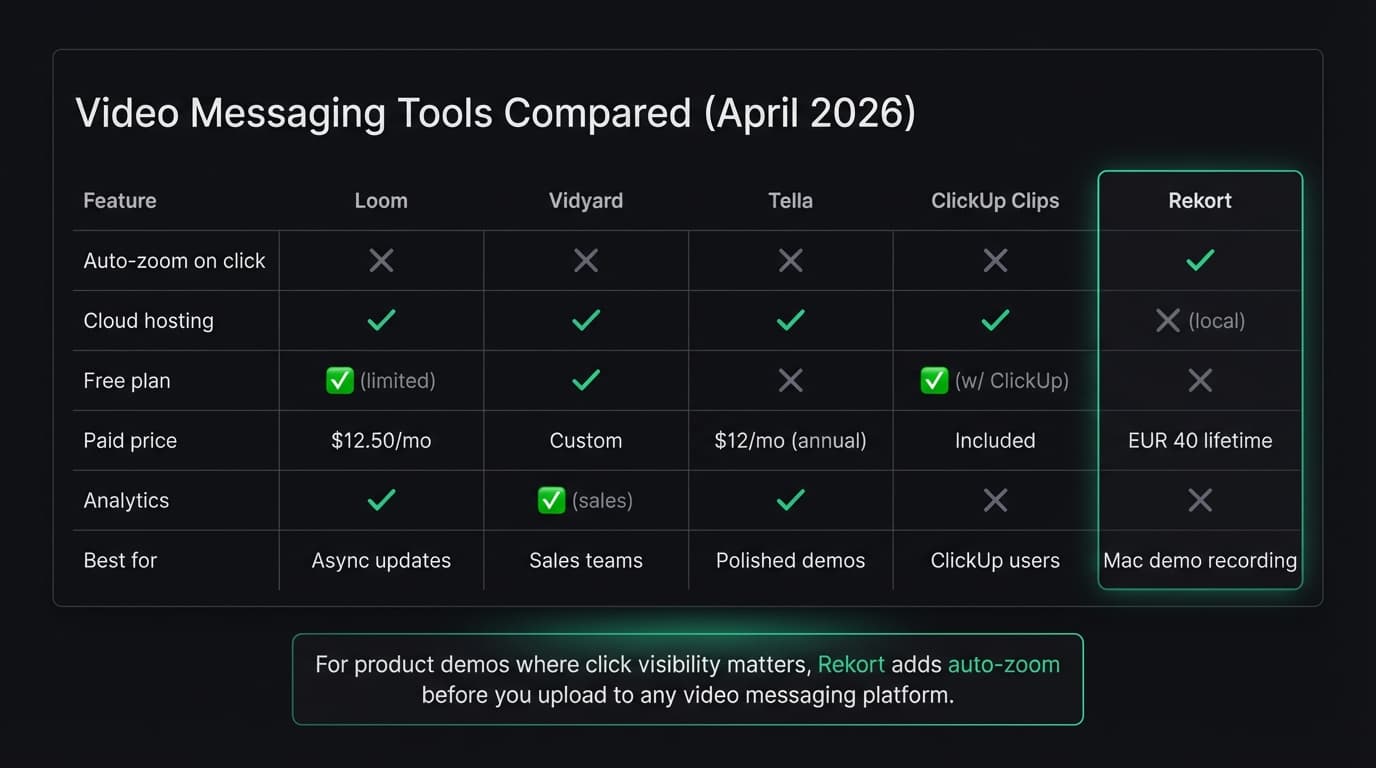
| Tool | Price | Auto-zoom | Cloud hosting | Best for |
|---|---|---|---|---|
| Loom | Free–$20/user/mo | No | Yes | General async communication |
| Vidyard | Free–custom | No | Yes | Sales outreach and CRM integration |
| Tella | $12–$49/mo | No | Yes | Polished demos and courses |
| ClickUp Clips | Free (with ClickUp) | No | Yes | Teams already using ClickUp |
| Rekort | $9/month, $49/year, or $79 lifetime | Yes | No (local) | Mac product demos with click zoom |
Loom#
Price: Free plan (25 videos, 5 min/video, 720p). Business: $12.50/creator/month billed annually ($15 month-to-month). Business + AI: $20/creator/month.
Loom is the default choice for async video messaging. The recorder runs in the browser or as a desktop app, and recordings are hosted on Loom's servers with a shareable link ready in seconds.
The free tier is genuinely useful for light use — quick bug reports, short walkthroughs, feedback on designs. Once you hit the 25-video cap or need recordings longer than 5 minutes, you need a paid plan.
Since Atlassian acquired Loom in 2023, the product has continued adding AI features: auto-transcription, summaries, video editing by editing the transcript. The paid tiers now include 4K quality and unlimited recordings.
What it does well:
- Fast link sharing — the URL is ready before you finish recording
- Viewer reactions and threaded comments
- AI transcript editing on paid plans
- Works on Mac, Windows, and in the browser
Where it falls short:
- No auto-zoom on clicks — UI actions can be hard to follow on small buttons
- Free plan is restrictive (25 video cap, 5-minute limit)
- No local export option — recordings live on Loom's servers
For a deeper comparison, see our Loom alternative roundup.
Continue reading
Product Demos Without the Editing
Record a walkthrough and Rekort handles the zoom. Export a polished demo in minutes.
Vidyard#
Price: Free plan available. Paid plans for teams and enterprise — pricing on request.
Vidyard targets sales teams. The free plan lets you record unlimited videos and share them via link. Paid plans add video analytics (who watched, when they dropped off), CRM integrations with HubSpot, Salesforce, and Salesloft, and AI avatar features.
The AI avatar is Vidyard's biggest differentiator in 2026: record 90 seconds of yourself talking, and the platform can generate personalized video messages in your likeness across 25+ languages. That's useful for sales outreach at scale, but it's well beyond what most teams need for internal communication or product demos.
What it does well:
- Free plan with no video cap
- Native integrations with major sales CRMs
- Strong viewer analytics for sales follow-up
- AI-generated personalized outreach videos
Where it falls short:
- Overkill for internal team communication or simple walkthroughs
- Paid plans are enterprise-priced and not transparent about cost
- No auto-zoom on clicks
Vidyard fits sales teams that need to track video engagement inside their CRM. It's not built for quick async updates or product demo creation.
Tella#
Price: Pro: $19/month or $12/month billed annually. Premium: $49/month or $39/month billed annually. Free trial: 7 days.
Tella sits between Loom and a presentation tool. You can record your screen and camera, add slide-style overlays, switch between multiple scenes, and produce something closer to a polished video than a quick screen capture.
The Pro plan includes unlimited recording, AI editing, 4K export, and team workspace. Premium adds custom branding, a custom domain, video analytics, and advanced sharing settings.
What it does well:
- Scene switching during recording (multiple camera angles or layouts)
- Cleaner output than raw screen recordings for client-facing demos
- Team workspaces on Pro+
- Good for async onboarding, e-courses, or polished product walkthroughs
Where it falls short:
- More setup required than Loom — not ideal for quick one-off recordings
- Cloud-hosted only — no local export path
- No auto-zoom on click
Tella is a good fit if you make recurring demo videos or courses and want more production value without video editing.
ClickUp Clips#
Price: Free with ClickUp (the free plan includes Clips).
If your team already uses ClickUp for project management, Clips is the fastest path to async video messaging — it's built directly into tasks and comments. Record your screen, attach it to a task, done.
There's no separate tool to install, no link management, no account to set up. The downside is that it only works well inside the ClickUp ecosystem. Sharing clips with people outside your ClickUp workspace is limited.
What it does well:
- Zero additional cost for ClickUp users
- Embedded directly in tasks and comments
- No recording limits or time caps on paid ClickUp plans
Where it falls short:
- Not useful if you're not using ClickUp already
- Limited sharing outside the workspace
- Basic recording features — no editing, no analytics, no auto-zoom
ClickUp Clips is worth using if you're already paying for ClickUp and want async video without adding another tool.
Rekort#
Price: $9/month, $49/year, or $79 lifetime.
Rekort is different from the others on this list in one important way: it's not primarily a video messaging tool. It's a Mac-native screen recorder that automatically zooms into your clicks, then exports as MP4 or GIF. There's no cloud hosting, no shareable link, no viewer analytics.
Where it fits in a video messaging workflow: recording the demo itself. If you're making a product walkthrough to share with a customer or post in Slack, Rekort handles the recording and zoom, then you upload to your hosting of choice — Loom, Google Drive, Notion, wherever.
The auto-zoom on click is the part that most video messaging tools skip. When you click a small button, the recording zooms in smoothly. Viewers can follow exactly what's happening without squinting at a full-screen capture. For product demos and software tutorials, that matters.
What it does well:
- Automatic zoom on every click — no manual editing
- Exports locally as MP4 or GIF
- Records system audio and microphone natively (no BlackHole workaround)
- One-time purchase option ($79 lifetime)
Where it falls short:
- Mac only — no Windows or browser recorder
- No cloud hosting or shareable links built in
- No viewer analytics or commenting
- You'll still need somewhere to host and share the recording
Rekort makes sense for Mac users who need polished product demo recordings and want click zoom without manual editing. It's not a replacement for Loom's async communication workflow — it's a better recorder to use before you upload to one.
How to choose#
For quick, everyday async communication — start with Loom's free tier. If you hit the 25-video cap regularly, upgrade or switch to Tella.
For sales outreach with CRM tracking — Vidyard is purpose-built for this. The free plan is a reasonable starting point.
For polished recurring demos or courses — Tella gives you more production control than Loom at a similar price.
For teams already on ClickUp — ClickUp Clips costs nothing extra and covers basic async video.
For Mac product demos where viewers need to see what you're clicking — use Rekort to record with auto-zoom, then upload the result to whichever tool hosts your videos.
For a broader look at tools that produce polished product demos, see our product demo software guide and how to make a product demo video.
Ready to record?
Rekort auto-zooms every click so your screen recordings look professional. No video editing required.
Download for MacmacOS 14+ · $9/month, $49/year, or $79 lifetime
Related Articles
How to Make a Product Demo Video (Without a Video Editor)
16 min read
Product Demo Video Script Template: A Five-Beat Plan You Can Copy
10 min read
SaaS Demo Video: How to Make One That Actually Converts
7 min read
How to Record Training Videos (Without a Video Editor)
7 min read
How to Record Software Demos That Convert
7 min read